Software-Oriented
Design of Basic Logic Gates using Xilinx Software
Aim
To design basic logic gates using Xilinx software and observe their functionality through simulations.
Apparatus & Software
| S.No. | Tool / Software | Purpose |
|---|---|---|
| 1 | Xilinx ISE / Vivado | HDL design entry and simulation |
| 2 | ISim / XSim Simulator | Functional simulation of logic gates |
| 3 | PC / Workstation | Running the Xilinx software environment |
Theory
Logic gates are the fundamental building blocks of all digital circuits. They perform basic logical operations on one or more binary inputs to produce a single binary output. Each gate implements a specific Boolean function. The seven fundamental logic gates explored in this experiment are described below.
- AND Gate: Output is high only when all inputs are high. Boolean expression: Y = A·B
- OR Gate: Output is high if at least one input is high. Boolean expression: Y = A+B
- NOT Gate: Output is the complement of the input; high when input is low and vice versa. Boolean expression: Y = A'
- NAND Gate: Output is high when at least one input is low; low only when all inputs are high. Boolean expression: Y = (A·B)'
- NOR Gate: Output is high only when all inputs are low; if any input is high, output is low. Boolean expression: Y = (A+B)'
- XOR Gate: Output is high if and only if an odd number of inputs are high; for two inputs, output is high when exactly one input is high. Boolean expression: Y = A⊕B
- XNOR Gate: Output is high if and only if all inputs are the same (both high or both low). Boolean expression: Y = (A⊕B)'
In Verilog HDLverilog hdlA Hardware Description Language used to model, simulate, and synthesize digital circuits. It describes hardware behavior at register-transfer or gate level. (Hardware Description Language), each gate can be described using dataflow modellingdataflow modellingA Verilog modelling style that describes circuit behavior using continuous assignments and logic expressions, focusing on how data flows between signals. with the assign statement and bitwise operators. The simulation is then used to verify the truth table of each gate by applying all possible input combinations and observing the output waveform.
The following truth tables summarize the expected output of each logic gate for all input combinations.
| Gate | Inputs | Output Y | Boolean Expression |
|---|---|---|---|
| AND | A=0,B=0 | A=0,B=1 | A=1,B=0 | A=1,B=1 | 0 | 0 | 0 | 1 | Y = A·B |
| OR | A=0,B=0 | A=0,B=1 | A=1,B=0 | A=1,B=1 | 0 | 1 | 1 | 1 | Y = A+B |
| NOT | X=0 | X=1 | 1 | 0 | Y = X' |
| NAND | A=0,B=0 | A=0,B=1 | A=1,B=0 | A=1,B=1 | 1 | 1 | 1 | 0 | Y = (A·B)' |
| NOR | A=0,B=0 | A=0,B=1 | A=1,B=0 | A=1,B=1 | 1 | 0 | 0 | 0 | Y = (A+B)' |
| XOR | A=0,B=0 | A=0,B=1 | A=1,B=0 | A=1,B=1 | 0 | 1 | 1 | 0 | Y = A⊕B |
| XNOR | A=0,B=0 | A=0,B=1 | A=1,B=0 | A=1,B=1 | 1 | 0 | 0 | 1 | Y = (A⊕B)' |
Pre-Lab / Circuit Diagram (Not Applicable)
This section is not required for this experiment.
Procedure
Part 1: Setting up the Project in Xilinx ISE/Vivado
1. Launch Software: Open Xilinx ISE Design Suite or Vivado from the desktop.
2. New Project: Go to `File > New Project`. Enter a name (e.g., `LogicGates_Exp1`) and select a location.
3. Device Settings: Select your target FPGAfpgaField-Programmable Gate Array — an integrated circuit containing configurable logic blocks and programmable interconnects that can be reconfigured after manufacturing to implement custom digital circuits. family (e.g., Spartan-6 or Artix-7), Device, Package, and Speed. Ensure 'Simulator' is set to ISim/Vivado Simulator and 'Preferred Language' is Verilog.
4. Finish: Click Next/Finish to create the empty project.
1. Launch Software: Open Xilinx ISE Design Suite or Vivado from the desktop.
2. New Project: Go to `File > New Project`. Enter a name (e.g., `LogicGates_Exp1`) and select a location.
3. Device Settings: Select your target FPGAfpgaField-Programmable Gate Array — an integrated circuit containing configurable logic blocks and programmable interconnects that can be reconfigured after manufacturing to implement custom digital circuits. family (e.g., Spartan-6 or Artix-7), Device, Package, and Speed. Ensure 'Simulator' is set to ISim/Vivado Simulator and 'Preferred Language' is Verilog.
4. Finish: Click Next/Finish to create the empty project.
Part 2: Creating the Verilog Module
1. Add Source: Right-click on the project hierarchy (or `Project > New Source`). Select Verilog Module.
2. Naming: Name the file (e.g., `and_gate`). Click Next.
3. Define Ports: In the wizard, define inputs (`a`, `b`) and output (`y`). Click Next -> Finish.
4. Write Code: The editor will open. Inside the module, write the assign statement (see Simulation section).
5. Save: Press `Ctrl+S` to save the file.
1. Add Source: Right-click on the project hierarchy (or `Project > New Source`). Select Verilog Module.
2. Naming: Name the file (e.g., `and_gate`). Click Next.
3. Define Ports: In the wizard, define inputs (`a`, `b`) and output (`y`). Click Next -> Finish.
4. Write Code: The editor will open. Inside the module, write the assign statement (see Simulation section).
5. Save: Press `Ctrl+S` to save the file.
Part 3: Simulation
1. Switch View: Change the 'Design' view from 'Implementation' to Simulation.
2. Select Module: Click on your Verilog file (`and_gate.v`) in the hierarchy.
3. Run Simulation: In the 'Processes' pane, expand ISim Simulator and double-click Simulate Behavioral Model.
4. Verify: A waveform window will open. Use the toolbar to force values on inputs `a` and `b` (or write a testbenchtestbenchA simulation environment written in HDL that applies input stimuli to a design under test and observes outputs to verify correct functionality.) and observe `y`.
1. Switch View: Change the 'Design' view from 'Implementation' to Simulation.
2. Select Module: Click on your Verilog file (`and_gate.v`) in the hierarchy.
3. Run Simulation: In the 'Processes' pane, expand ISim Simulator and double-click Simulate Behavioral Model.
4. Verify: A waveform window will open. Use the toolbar to force values on inputs `a` and `b` (or write a testbenchtestbenchA simulation environment written in HDL that applies input stimuli to a design under test and observes outputs to verify correct functionality.) and observe `y`.
Part 4: FPGA Implementation (Optional)
1. Synthesize: Switch back to Implementation view. Double-click Synthesize - XST to check for errors.
2. Constraints: Add a User Constraints File (.ucf/.xdc) to map ports `a`, `b`, `y` to physical switches and LEDs on the board.
3. Generate BitstreambitstreamThe binary configuration file downloaded to an FPGA that programs its internal logic blocks and routing interconnects to implement a specific design.: Run 'Generate Programming File'.
4. Program: Connect the FPGA board via USB and use iMPACT/Hardware Manager to flash the bitstream.
1. Synthesize: Switch back to Implementation view. Double-click Synthesize - XST to check for errors.
2. Constraints: Add a User Constraints File (.ucf/.xdc) to map ports `a`, `b`, `y` to physical switches and LEDs on the board.
3. Generate BitstreambitstreamThe binary configuration file downloaded to an FPGA that programs its internal logic blocks and routing interconnects to implement a specific design.: Run 'Generate Programming File'.
4. Program: Connect the FPGA board via USB and use iMPACT/Hardware Manager to flash the bitstream.
Simulation / Execution
The core Verilog syntax used for each gate using dataflow modelling is provided below:
AND Gate
verilog
assign y = a & b;OR Gate
verilog
assign y = a | b;NOT Gate
verilog
assign y = ~x;NAND Gate
verilog
assign y = ~(a & b);NOR Gate
verilog
assign y = ~(a | b);XOR Gate
verilog
assign y = a ^ b;XNOR Gate
verilog
assign y = ~(a ^ b);Observations
Simulations were performed in Xilinx ISim for each gate. The output waveforms confirmed the expected truth table behaviour for all gates.
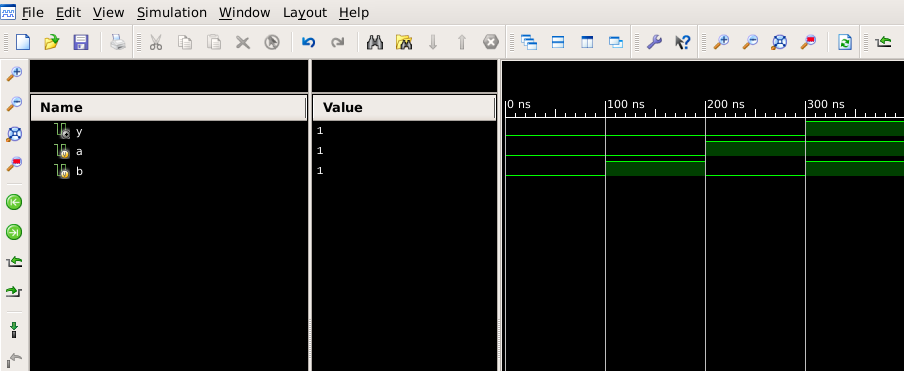
Simulation waveform for AND gate: output y is high only when both a and b are high.
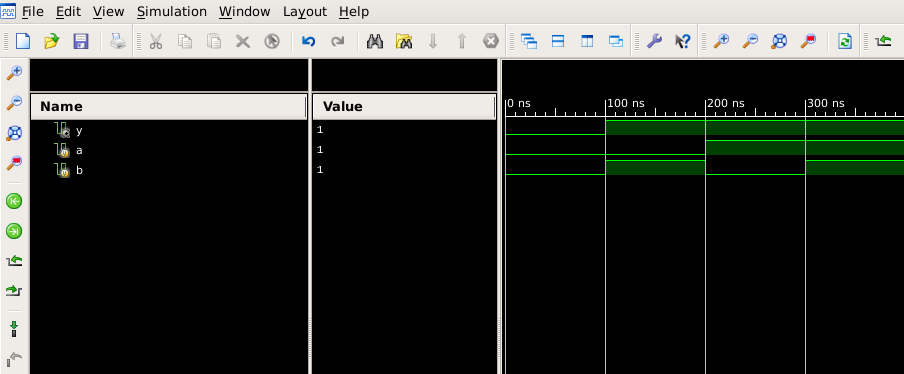
Simulation waveform for OR gate: output y is high when at least one input is high.
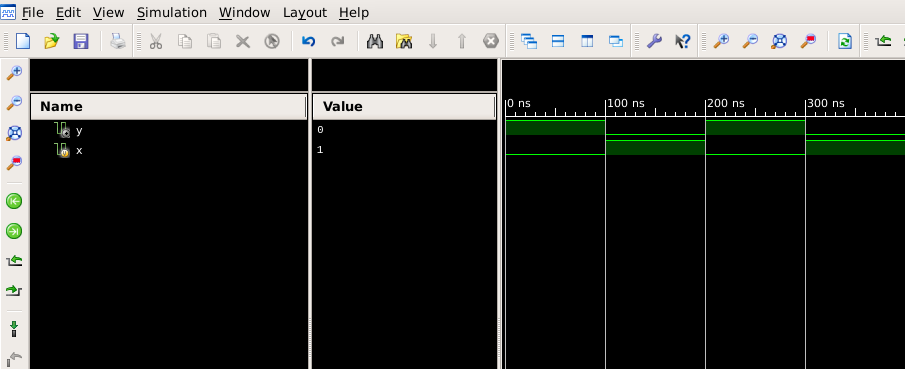
Simulation waveform for NOT gate: output is complement of input.
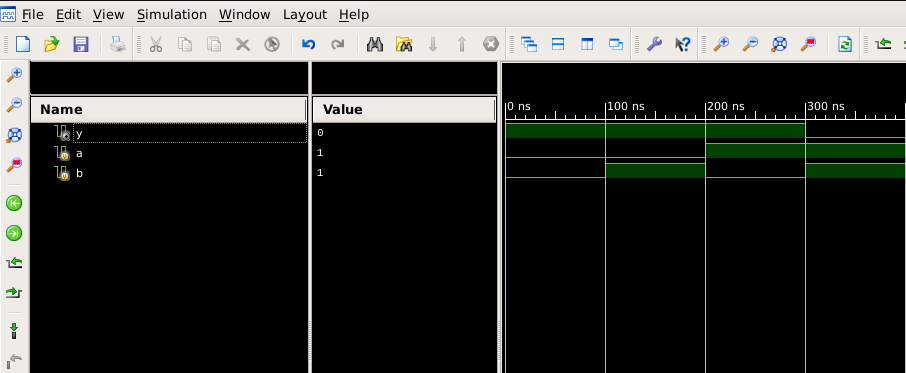
Simulation waveform for NAND gate: output is low only when both inputs are high.
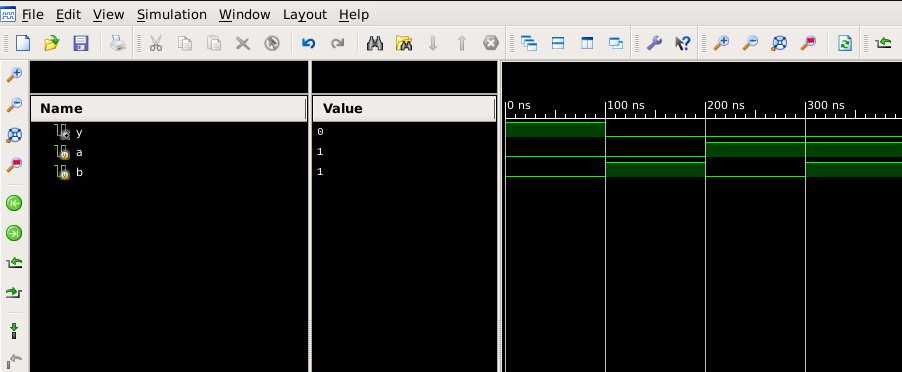
Simulation waveform for NOR gate: output is high only when both inputs are low.
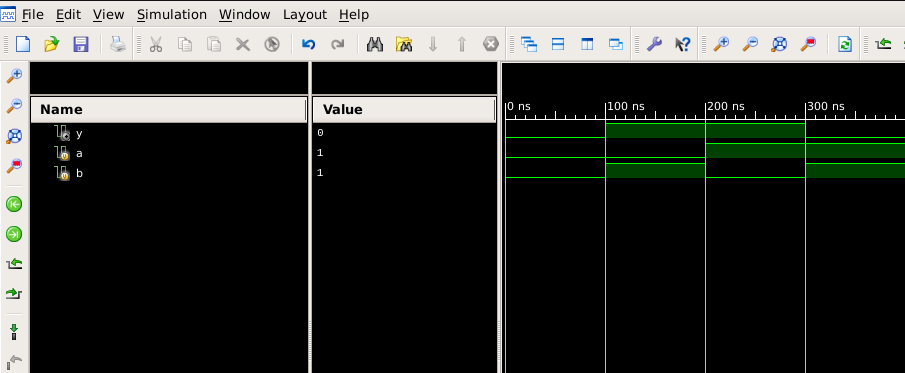
Simulation waveform for XOR gate: output is high only when inputs differ.
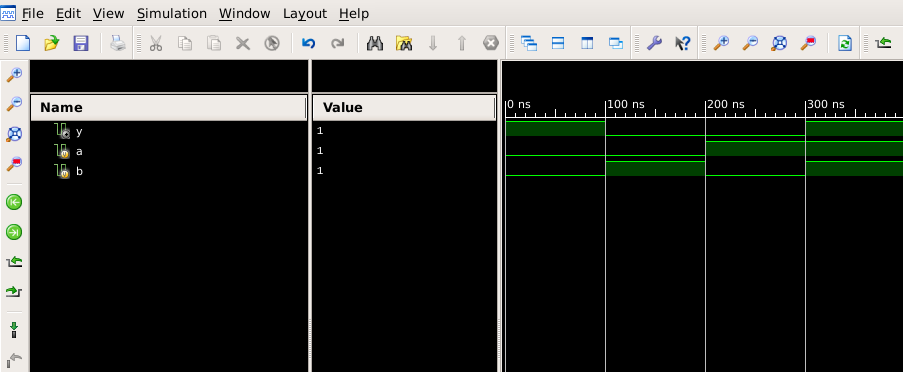
Simulation waveform for XNOR gate: output is high only when both inputs are equal.
Calculations (Not Applicable)
This section is not required for this experiment.
Results & Analysis
The fundamental logic gates were successfully verified. Key observations from the simulation include:
- AND / OR / NOT: Basic boolean operations matched theoretical truth tables exactly.
- NAND / NOR: Confirmed as universal gates by producing inverted outputs of AND/OR respectively.
- XOR vs XNOR: XOR produced high output for distinct inputs (inequality detector), while XNOR produced high output for identical inputs (equality detector).
Conclusion
This experiment established the foundation of digital design by implementing fundamental logic blocks in Verilog. By validating these gates using dataflow modelling, we confirmed that hardware behavior can be accurately described using high-level language constructs before physical deployment.
Post-Lab / Viva Voce
- Q: What is a universal gate, and why are NAND and NOR referred to as universal gates?
A: A universal gate is one that can be used to implement any Boolean function without using any other type of gate. NAND and NOR are called universal gates because any logic gate — AND, OR, NOT, XOR, XNOR, etc. — can be constructed entirely using either NAND gates alone or NOR gates alone. This property makes them extremely useful in digital circuit design, as it reduces the variety of gate types required in fabrication. - Q: What is the difference between XOR and XNOR gates?
A: An XOR (Exclusive OR) gate produces a high output only when the number of high inputs is odd — for a two-input gate, output is high when inputs are different. An XNOR (Exclusive NOR) gate is the complement of XOR; it produces a high output when both inputs are the same (both high or both low). Their Boolean expressions are Y = A⊕B for XOR and Y = (A⊕B)' for XNOR. - Q: What is the purpose of the assign statement in Verilog, and in which modelling style is it used?
A: The assign statement is used for continuous assignment in Verilog. It is part of the dataflow modelling style, where the output is continuously driven by the specified expression. Whenever any variable on the right-hand side changes, the output is immediately updated. It is typically used to describe combinational logic without explicitly declaring always blocks or gate primitives. - Q: How can a NOT gate be implemented using a NAND gate?
A: A NOT gate can be implemented using a single NAND gate by connecting both inputs of the NAND gate together and feeding the same signal to both. When the single input A is applied to both inputs, the NAND output is (A·A)' = A', which is the complement of A — identical to a NOT gate. - Q: What is the difference between combinational and sequential logic circuits?
A: Combinational logic circuits produce outputs that depend solely on the current input values, with no memory element. Logic gates, adders, multiplexers, and decoders are examples. Sequential logic circuits, on the other hand, have outputs that depend on both current inputs and past states (memory). Flip-flops, registers, and counters are examples of sequential circuits. The experiment covers combinational logic. - Q: What is meant by propagation delaypropagation delayThe time taken for a signal change at the input of a logic gate or circuit to appear at the output. It limits the maximum operating frequency of a digital system. in a logic gate?
A: Propagation delay is the time taken for a change in the input of a logic gate to produce a corresponding change at the output. It is caused by the physical capacitance and resistance of transistors within the gate. In simulation, ideal gates have zero propagation delay, but in real hardware implementations on FPGA or ASIC, propagation delay affects the maximum operating frequency of the circuit. - Q: Why is the XNOR gate also known as an equivalence gate?
A: The XNOR gate is known as an equivalence gate because its output is high (1) if and only if both its inputs are equal — either both 0 or both 1. It effectively performs a logical equivalence check between two binary signals, making it useful in comparator circuits where equality detection is required.
References & Resources
Digital Electronics Lab Manual
Download Common Lab Manual (PDF)
Download Common Lab Manual (PDF)
Note: This manual covers all experiments for the Digital Electronics course.
Was this experiment helpful?
Your feedback helps us improve
Please Sign In to rate this experiment.