Hardware-Oriented
Design and Implementation of 2-bit OR Gate on FPGA Board
Aim
To design and implement a 2-bit OR gate on the FPGAfpgaField-Programmable Gate Array — an integrated circuit containing configurable logic blocks and programmable interconnects that can be reconfigured after manufacturing to implement custom digital circuits. board.
Apparatus & Software
| S.No. | Tool / Equipment | Purpose |
|---|---|---|
| 1 | FPGA Development Board (Spartan-6) | Hardware implementation and verification |
| 2 | Xilinx ISE Software | HDL design entry, synthesis, and implementation |
| 3 | ISim Simulator | Functional simulation before hardware download |
| 4 | USB Programming Cable | Downloading bitstream to FPGA board |
| 5 | PC / Workstation | Running the Xilinx software environment |
Theory
An OR gate is a basic digital logic gate that implements logical disjunction. It produces a high output (1) if at least one of its inputs is high (1). If all inputs are low (0), the output is low (0).
The Boolean expression for a 2-input OR gate is Y = A + B. In Verilog HDLverilog hdlA Hardware Description Language used to model, simulate, and synthesize digital circuits. It describes hardware behavior at register-transfer or gate level., this is implemented using the bitwise OR operator `|`.
The truth table for a 2-input OR gate is:
| A | B | Y = A + B |
|---|---|---|
| 0 | 0 | 0 |
| 0 | 1 | 1 |
| 1 | 0 | 1 |
| 1 | 1 | 1 |
Pre-Lab / Circuit Diagram (Not Applicable)
This section is not required for this experiment.
Procedure
Part 1: Setting up the Project in Xilinx ISE/Vivado
1. Launch Software: Open Xilinx ISE Design Suite or Vivado from the desktop.
2. New Project: Go to `File > New Project`. Enter a name (e.g., `OR_Gate_Exp2`) and select a location.
3. Device Settings: Select your target FPGA family (e.g., Spartan-6 or Artix-7), Device, Package, and Speed. Ensure 'Simulator' is set to ISim/Vivado Simulator and 'Preferred Language' is Verilog.
4. Finish: Click Next/Finish to create the empty project.
1. Launch Software: Open Xilinx ISE Design Suite or Vivado from the desktop.
2. New Project: Go to `File > New Project`. Enter a name (e.g., `OR_Gate_Exp2`) and select a location.
3. Device Settings: Select your target FPGA family (e.g., Spartan-6 or Artix-7), Device, Package, and Speed. Ensure 'Simulator' is set to ISim/Vivado Simulator and 'Preferred Language' is Verilog.
4. Finish: Click Next/Finish to create the empty project.
Part 2: Creating the Verilog Module
1. Add Source: Right-click on the project hierarchy (or `Project > New Source`). Select Verilog Module.
2. Naming: Name the file (e.g., `or_gate`). Click Next.
3. Define Ports: In the wizard, define inputs (`a`, `b`) and output (`y`). Click Next -> Finish.
4. Write Code: The editor will open. Inside the module, write the assign statement (see Simulation section).
5. Save: Press `Ctrl+S` to save the file.
1. Add Source: Right-click on the project hierarchy (or `Project > New Source`). Select Verilog Module.
2. Naming: Name the file (e.g., `or_gate`). Click Next.
3. Define Ports: In the wizard, define inputs (`a`, `b`) and output (`y`). Click Next -> Finish.
4. Write Code: The editor will open. Inside the module, write the assign statement (see Simulation section).
5. Save: Press `Ctrl+S` to save the file.
Part 3: Simulation
1. Switch View: Change the 'Design' view from 'Implementation' to Simulation.
2. Select Module: Click on your Verilog file (`or_gate.v`) in the hierarchy.
3. Run Simulation: In the 'Processes' pane, expand ISim Simulator and double-click Simulate Behavioral Model.
4. Verify: A waveform window will open. Use the toolbar to force values on inputs `a` and `b` (or write a testbenchtestbenchA simulation environment written in HDL that applies input stimuli to a design under test and observes outputs to verify correct functionality.) and observe `y`.
1. Switch View: Change the 'Design' view from 'Implementation' to Simulation.
2. Select Module: Click on your Verilog file (`or_gate.v`) in the hierarchy.
3. Run Simulation: In the 'Processes' pane, expand ISim Simulator and double-click Simulate Behavioral Model.
4. Verify: A waveform window will open. Use the toolbar to force values on inputs `a` and `b` (or write a testbenchtestbenchA simulation environment written in HDL that applies input stimuli to a design under test and observes outputs to verify correct functionality.) and observe `y`.
Part 4: FPGA Implementation
1. Synthesize: Switch back to Implementation view. Double-click Synthesize - XST to check for errors.
2. Constraints: Add a User Constraints File (.ucf/.xdc) to map ports `a`, `b`, `y` to physical switches P22, P21, P30 (or confirming to your board).
3. Generate BitstreambitstreamThe binary configuration file downloaded to an FPGA that programs its internal logic blocks and routing interconnects to implement a specific design.: Run 'Generate Programming File'.
4. Program: Connect the FPGA board via USB and use iMPACT/Hardware Manager to flash the bitstream.
1. Synthesize: Switch back to Implementation view. Double-click Synthesize - XST to check for errors.
2. Constraints: Add a User Constraints File (.ucf/.xdc) to map ports `a`, `b`, `y` to physical switches P22, P21, P30 (or confirming to your board).
3. Generate BitstreambitstreamThe binary configuration file downloaded to an FPGA that programs its internal logic blocks and routing interconnects to implement a specific design.: Run 'Generate Programming File'.
4. Program: Connect the FPGA board via USB and use iMPACT/Hardware Manager to flash the bitstream.
Simulation / Execution
Verilog Code for 2-bit OR Gate:
verilog
assign y = a | b;User Constraints File (UCF):
properties
NET "a" LOC = P22;
NET "b" LOC = P21;
NET "y" LOC = P30;
Observations
Hardware implementation was performed on the FPGA board. The two rightmost switches represent inputs A and B respectively, while the third switch position represents the output Y (LED). All four input combinations were tested.
| Case | A | B | Output Y (Observed) | Expected Y |
|---|---|---|---|---|
| 1 | 0 | 0 | 0 (LED OFF) | 0 |
| 2 | 0 | 1 | 1 (LED ON) | 1 |
| 3 | 1 | 0 | 1 (LED ON) | 1 |
| 4 | 1 | 1 | 1 (LED ON) | 1 |
Detailed Test Cases:
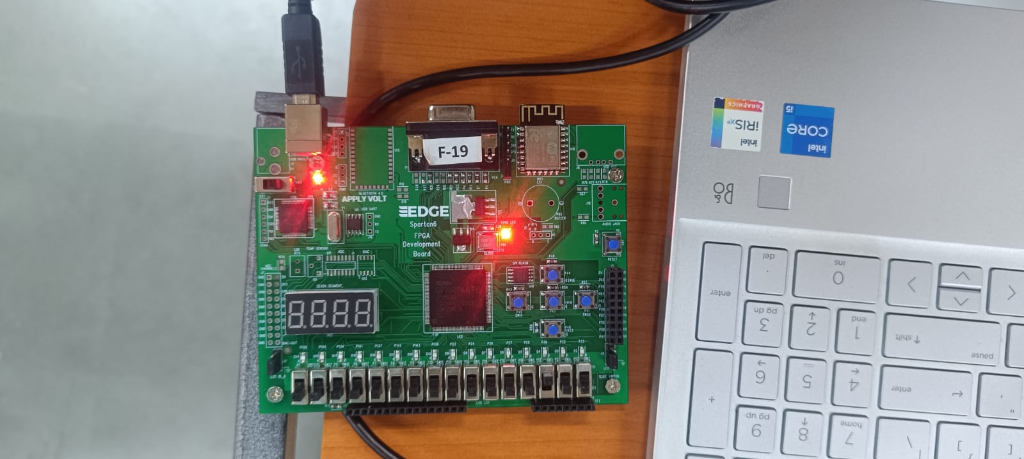
Case 1: A=0, B=0 — Output Y=0 (LED off).
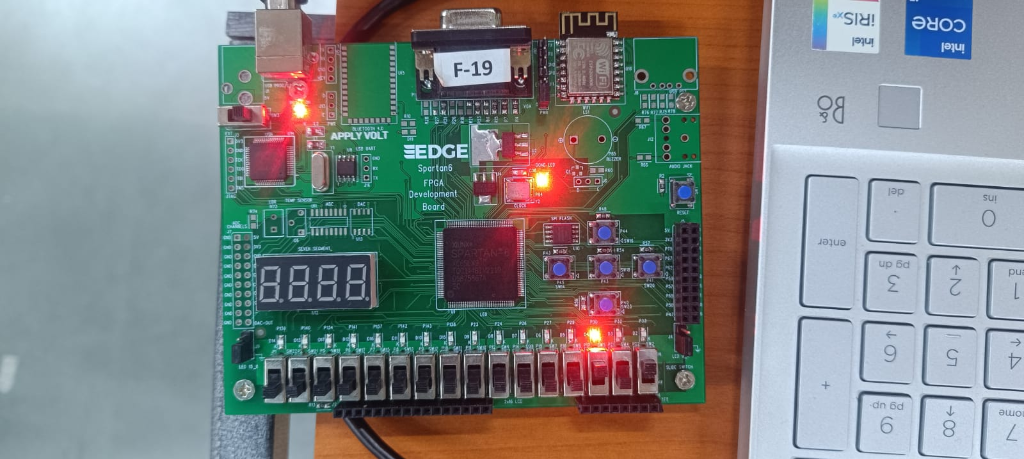
Case 2: A=0, B=1 — Output Y=1 (LED on).
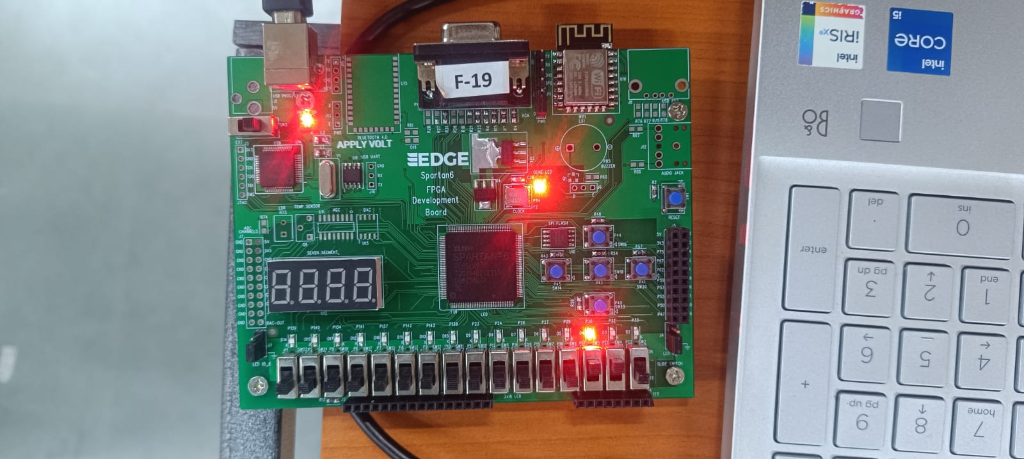
Case 3: A=1, B=0 — Output Y=1 (LED on).
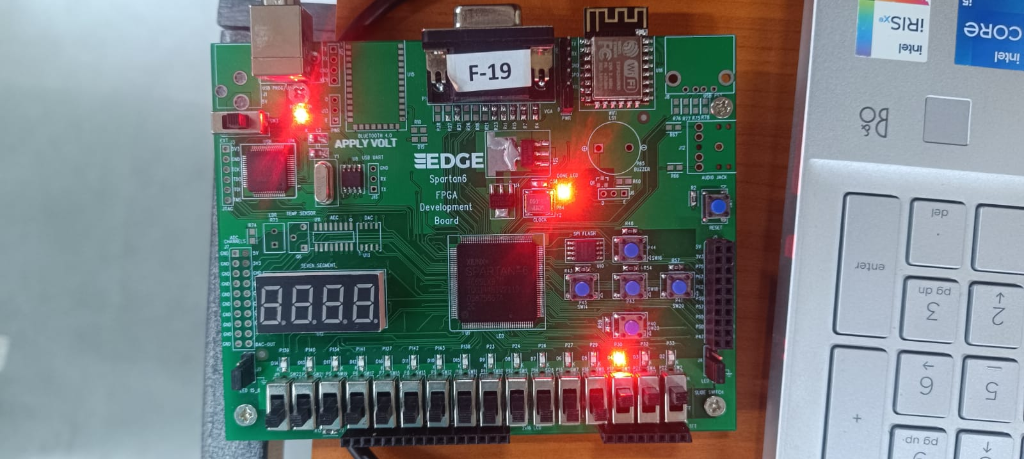
Case 4: A=1, B=1 — Output Y=1 (LED on).
Calculations
The Boolean expression verification:
| A | B | A + B (Boolean) | Observed Output |
|---|---|---|---|
| 0 | 0 | 0 + 0 = 0 | 0 |
| 0 | 1 | 0 + 1 = 1 | 1 |
| 1 | 0 | 1 + 0 = 1 | 1 |
| 1 | 1 | 1 + 1 = 1 | 1 |
Results & Analysis
The FPGA implementation process yielded the following specific results:
- SynthesissynthesisThe process of converting an HDL description into a gate-level netlist that can be mapped to the target hardware's logic elements.: The Verilog HDL was correctly synthesized into a gate-level netlistnetlistA structured description of a circuit in terms of components (gates, flip-flops) and the connections between them, generated after synthesis. without errors.
- Pin Mapping: The UCF file successfully routed logical ports `a`, `b` (inputs) and `y` (output) to physical toggle switches and LEDs.
- Hardware Verification: On-board testing confirmed the OR logic: Output LED turned ON for inputs 01, 10, and 11, and remained OFF for 00.
Conclusion
Implementing a simple OR gate provided a complete walkthrough of the FPGA design flow—from HDL entry to bitstream generation. It demonstrated how logical abstractions are physically realized using Look-Up Tables (LUTs) within the FPGA fabric, bridging the gap between software simulation and physical hardware behavior.
Post-Lab / Viva Voce
- Q: What is the role of the User Constraints File (UCF) in FPGA implementation?
A: The User Constraints File (UCF) maps the logical port names defined in the Verilog module to physical pin locations on the FPGA device. It also allows specification of timing constraints, voltage standards, and I/O standards. - Q: What is the difference between simulation and hardware implementation in FPGA design?
A: Simulation verifies the logical correctness of a design in software before committing to hardware. Hardware implementation involves synthesizing the Verilog code into a gate-level netlist and generating a bitstream that is downloaded to the physical FPGA device. - Q: What is a Look-Up Tablelook-up tableA small memory block inside an FPGA that stores precomputed output values for a logic function. It is the fundamental building block of FPGA logic cells. (LUT) in the context of FPGAs?
A: A Look-Up Table (LUT) is the fundamental programmable logic element inside an FPGA. It effectively stores the truth table of a combinational function, allowing any combinational logic function of n inputs to be implemented using a single LUT. - Q: Why is Verilog described as a Hardware Description Language rather than a programming language?
A: Unlike software programming languages where code executes sequentially, Verilog describes hardware structure and concurrent behaviour. In Verilog, multiple assign statements execute simultaneously (in parallel), mirroring the parallel nature of physical digital circuits. - Q: What is the significance of the assign statement in Verilog?
A: The assign statement is used for continuous combinational logic, where the output immediately reflects any change in the input expression. - Q: How would you implement a 3-input OR gate in Verilog?
A: A 3-input OR gate in Verilog would be written as: `assign y = a | b | c;`. The output y is high whenever at least one of the three inputs is high. - Q: What are the advantages of using FPGAs over fixed-function logic ICs?
A: FPGAs offer reprogrammability, meaning the hardware can be reconfigured. They support high gate densities and allow rapid prototyping, unlike fixed-function ICs which are dedicated to one function.
References & Resources
Digital Electronics Lab Manual
Download Common Lab Manual (PDF)
Download Common Lab Manual (PDF)
Note: This manual covers all experiments for the Digital Electronics course.
Was this experiment helpful?
Your feedback helps us improve
Please Sign In to rate this experiment.