Hardware-Oriented
Object Detection using an IR sensor and ESP32
Aim
To design and implement an IoT-based proximity detection system using an IR sensor and ESP32esp32A low-cost, low-power system-on-a-chip microcontroller with integrated Wi-Fi and Bluetooth capabilities, widely used by students and engineers for IoT applications and sensor data acquisition. to detect objects within a 5 cm threshold and log events to Google Sheets.
Apparatus & Software
Hardware Components:
- ESP32
- IR Proximity Sensor
- Jumper Wires (Male–Male / Male–Female)
- USB Cable
- Breadboard
- Test Object (for proximity detection)
- Measuring Scale or Ruler
- Screwdriver (optional, to adjust the sensor detection range)
Software and Tools:
- Computer or Laptop
- Arduino IDE
- ESP32 Board Support Package
- Google Sheets
- Active Internet Connection (Wi-Fi)
System Block Diagram:
IR Sensor → ESP32 → Wi-Fi → Google Apps Script → Google Sheets
Theory
1.1 Infrared Sensing Principle
An IR proximity sensor operates by emitting infrared light through an IR LED and detecting the reflected light using a photodiode or phototransistor. When an object is present within the detection range, the emitted IR light reflects off its surface and is received by the detector. The sensor produces a digital output signal that changes state based on whether the reflected intensity crosses a preset threshold.
The intensity of the reflected IR signal follows an inverse-square relationship with distance:
where is the emitted IR intensity, is the reflectivity of the object surface, and is the distance between the sensor and the object. As increases, decreases rapidly, which defines the effective detection range of the sensor.
1.2 IR Sensor Output and Detection Threshold
A typical digital IR proximity sensor includes an onboard comparator circuit and a trimmer potentiometer. The potentiometer sets the reference voltage against which the photodetector output is compared. When the received IR intensity corresponds to a voltage exceeding this reference, the digital output pin is driven LOW (object detected). When no object is present or the object is beyond the range, the output remains HIGH. This active-low behavior is a common convention in digital IR sensor modules.
The detection threshold distance can be adjusted by varying the potentiometer, which effectively changes the comparator reference voltage :
In this experiment, the threshold is configured to approximately 5 cm to define the proximity detection boundary.
1.3 ESP32 GPIO and Digital Input Reading
The ESP32 is a dual-core 32-bit microcontroller operating at up to 240 MHz, equipped with integrated Wi-Fi (IEEE 802.11 b/g/n) and Bluetooth peripherals. Its General Purpose Input/Output (GPIO) pins can be configured in firmware as digital inputs with optional internal pull-up or pull-down resistors. In this experiment, the digital output of the IR sensor is connected to a GPIO pin configured as an input. The ESP32 reads the pin state in each loop iteration to determine the current detection status.
The firmware uses edge detection logic to identify state transitions. A change from HIGH to LOW indicates an object has entered the detection zone, while a LOW to HIGH transition indicates the object has moved away. This event-driven approach minimises redundant HTTP transmissions by logging only on state changes rather than on every polling cycle.
1.4 Wi-Fi Communication and Cloud Logging
The ESP32 connects to a local Wi-Fi access point in Station (STA) mode and obtains a dynamic IP address via DHCP. Upon detecting a state change, the ESP32 constructs an HTTP GET request containing the detection event and transmits it to a Google Apps Script web application endpoint. The Apps Script function parses the incoming request, appends a new row to a designated Google Sheet, and assigns a server-generated timestamp to each logged entry.
The end-to-end latency for a single log operation can be expressed as:
Under typical network conditions, lies in the range of 300 ms to 2 s. Since logging is triggered only on detection events rather than at a fixed sampling rate, the impact of this latency on system responsiveness is minimal for slow-moving objects.
1.5 System Data Flow
The complete data pipeline in this experiment proceeds as follows: the IR sensor continuously monitors the region in front of it and asserts its digital output pin when an object enters the 5 cm threshold. The ESP32 GPIO detects this logic-level change, identifies the event type (Object Detected or Object Removed), and prints the status to the Serial Monitor over UART. Simultaneously, the event string is embedded into an HTTP GET request and transmitted over Wi-Fi to the Google Apps Script endpoint, which records the event and a server-side timestamp into Google Sheets for persistent cloud storage and subsequent analysis.
Pre-Lab / Circuit Diagram
Circuit Connections:
Note: A circuit diagram is not available for this experiment. Please follow the connection details below.
- IR Sensor VCC → ESP32 VIN (or 3.3V/5V as per sensor spec)
- IR Sensor GND → ESP32 GND
- IR Sensor OUT → ESP32 GPIO Pin (e.g., D2 or as defined in code)
Procedure
- Connect the ESP32 and IR Proximity Sensor on a breadboard using jumper wires.
- Verify the VCC, GND, and OUT pin connections between the ESP32 and the IR sensor.
- Connect the ESP32 to a computer using a USB cable and open the Arduino IDE.
- Select the appropriate ESP32 board and COM port, then execute the ESP32 program code.
- Upload the program and open the Serial Monitor to observe real-time distance measurements by placing objects at different distances from the sensor.
- Create a Google Sheet and open the Apps Script editor from the Extensions menu.
- Execute the required function and deploy it as a web application.
- Enter the generated web application URL and Wi-Fi credentials in the ESP32 program and upload the updated code.
- Verify that the measured distance values along with timestamps are logged correctly in Google Sheets and displayed on the Serial Monitor.
Simulation / Execution
Arduino IDE Code:
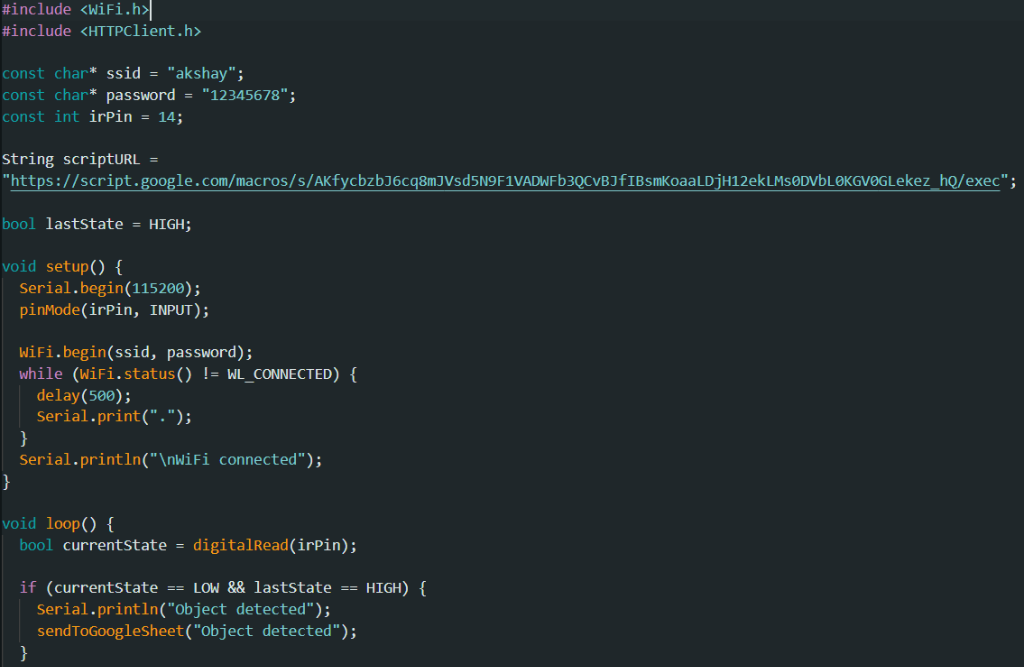
Arduino IDE Code (Part 1: Setup)
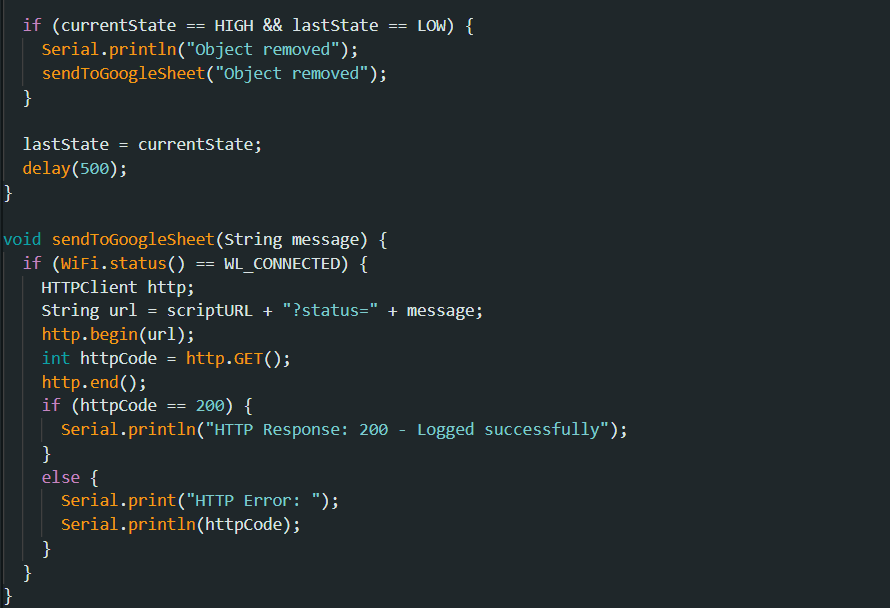
Arduino IDE Code (Part 2: Loop)
Google Apps Script Code:
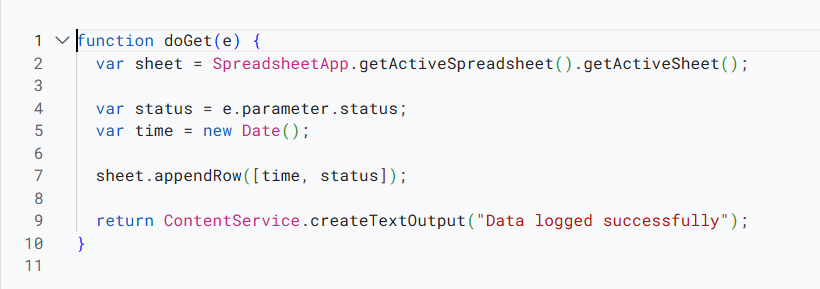
Google Apps Script Code
Observations
- The Serial Monitor displayed real-time proximity detection status whenever an object is either placed or removed from in front of the IR sensor.
- When the object is within the predefined 5 cm range, the text "Object Detected" is observed on the Serial Monitor.
- When an object is removed from the 5cm range, the text "Object Removed" is observed on the Serial Monitor.
- The ESP32 successfully connected to the configured Wi-Fi network and transmitted the detection data to Google Sheets.
- Each event is logged in Google Sheets along with the corresponding timestamp and detection message.
- If the HTTP request succeeds, a message is displayed on the Serial Monitor describing the successful logging of the data.
- The screenshots of both Serial Monitor and Google sheet are attached.
- The Google Sheets link: Google Sheets Data
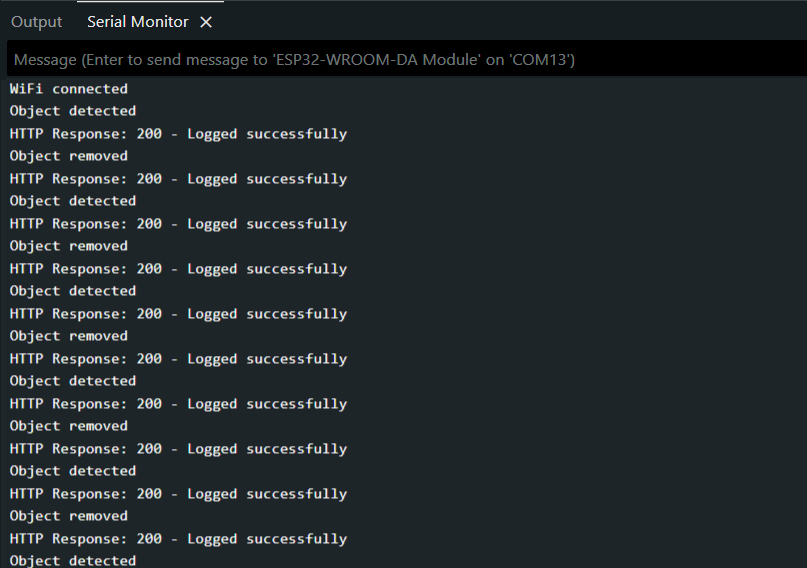
Serial Monitor Output Showing Proximity Detection
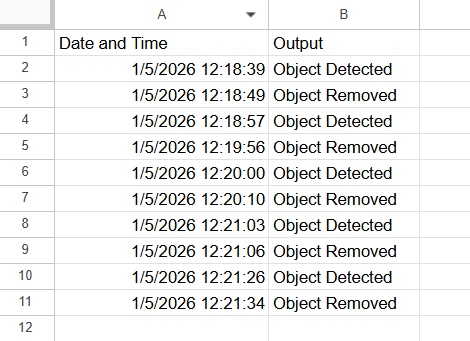
Google Sheets Showing Logged Data with Timestamp
Calculations (Not Applicable)
This section is not required for this experiment.
Results & Analysis
The IoT-based proximity detection system using an IR sensor and ESP32 was successfully designed and implemented. The IR sensor reliably detected objects placed within the predefined threshold distance of 5 cm. The detection response was observed in real time through the Serial Monitor, confirming correct sensor operation and microcontroller interfacing.
The ESP32 successfully connected to the configured Wi-Fi network and transmitted proximity detection data to Google Sheets using a deployed Google Apps Script web application. Each event was logged accurately along with the corresponding timestamp and detection message. The data was updated automatically in the Google Sheet without manual intervention, demonstrating cloud-based data logging.
Limitations:
- Ambient Light Sensitivity: The IR sensor may give false readings in direct sunlight or strong ambient light.
- Surface Reflectivity: Detection range varies based on the color and material of the object (dark objects absorb IR, reducing range).
- Network Latency: There may be a slight delay in logging data to Google Sheets depends on Wi-Fi signal strength.
Overall, the experiment achieved its objective of detecting nearby objects within a specified range and logging the detection events to an online platform for analysis. The results confirm the effective integration of hardware sensing, wireless communication, and cloud data storage using an IoT-based approach.
Conclusion
The experiment successfully demonstrated an IoT-based system for proximity detection and cloud logging. The IR sensor interfaced with ESP32 accurately detected objects within the 5 cm range, and data was reliably transmitted to Google Sheets via Wi-Fi, verifying the practical application of IoT integration.
Post-Lab / Viva Voce
Note: The following questions are intended to evaluate conceptual understanding and practical reasoning arising from the experiment.
- Q: Explain the working principle of a digital IR proximity sensor. How does the onboard potentiometer influence the detection range?
A: The sensor emits IR light via an LED and a photodetector measures the reflected intensity from nearby objects. An onboard comparator compares the photodetector voltage against a reference set by the potentiometer. Increasing the reference voltage raises the threshold intensity required to trigger detection, effectively reducing the detection range. Decreasing the reference voltage lowers this threshold, allowing detection at greater distances. The potentiometer thus provides a hardware-level mechanism to tune the 5 cm detection boundary used in this experiment. - Q: Why does the firmware log only on state transitions rather than continuously in every loop iteration?
A: Logging on every iteration would generate a large volume of redundant HTTP requests for the same steady state, rapidly consuming Wi-Fi bandwidth and Google Sheets API quota. Since the detection state changes only when an object enters or exits the threshold zone, event-driven logging captures every meaningful change with minimal traffic. This approach also reduces the likelihood of overlapping HTTP requests and lowers overall power consumption of the ESP32. - Q: The IR sensor output is active-low. A student reads the GPIO pin and finds it continuously LOW even with no object present. List three possible causes and the corresponding diagnostic steps.
A: First, the sensor may be receiving excessive ambient IR radiation such as direct sunlight or incandescent lighting, which can saturate the photodetector and hold the output LOW — the student should shield the sensor from ambient light sources and retest. Second, the potentiometer may be adjusted to maximum sensitivity, causing the comparator threshold to be too low and triggering on background reflections — the student should turn the potentiometer to reduce sensitivity until the output returns HIGH in open air. Third, the signal wire between the sensor output pin and the ESP32 GPIO may be shorted to ground — the student should verify continuity with a multimeter and reseat the jumper connections. - Q: Why is the timestamp for each logged event generated on the Google Apps Script server rather than on the ESP32 itself?
A: The ESP32 does not carry a battery-backed real-time clock module and loses its time reference whenever it is powered off or reset. Without an NTP synchronisation step, any timestamp generated on the ESP32 would be unreliable and inconsistent across sessions. The Google Apps Script server always has access to an accurate system clock, ensuring that timestamps are correct and consistent. A consequence of this design is that the logged timestamp reflects the moment the HTTP request is processed on the server rather than the exact instant of detection, introducing a small latency offset equal to . - Q: If the ESP32 reports correct detection events on the Serial Monitor but no rows appear in Google Sheets, what are the most likely causes?
A: The most probable causes are: the Apps Script has not been deployed as a publicly accessible web application, meaning external HTTP requests are rejected — the deployment settings should be reviewed and access set to 'Anyone'; the web application URL in the ESP32 firmware is incorrect or corresponds to an outdated deployment — the current deployment URL should be copied and the firmware re-uploaded; or the ESP32 has lost its Wi-Fi connection after the initial handshake, causing HTTP requests to silently fail — the Serial Monitor should be checked for Wi-Fi reconnection messages and the connection reliability verified. - Q: How does the surface reflectivity of an object affect IR proximity detection, and is this error systematic or random?
A: The intensity of the reflected IR signal is directly proportional to the surface reflectivity . A highly reflective surface such as white paper reflects more IR energy back to the photodetector, causing the sensor to trigger at distances greater than the calibrated 5 cm threshold. A dark or matte surface absorbs more IR energy, causing the effective detection range to be shorter than intended. This is a systematic error because its direction depends on a fixed material property of the object; all measurements with that object will be consistently biased in the same direction. - Q: What hardware addition and firmware modification would be required to measure the speed at which an object approaches the sensor?
A: Speed measurement using a single digital IR sensor is not directly possible since the sensor only provides a binary present/absent output at a fixed threshold. To estimate approach speed, a second IR sensor or an analog-output distance sensor such as the HC-SR04 ultrasonic module would need to be added. With two spatially separated binary sensors, the firmware could record the timestamps and at which each sensor triggers and compute the approach speed as , where is the known separation between the two sensor detection planes. The firmware would need to store the first trigger timestamp and transmit the computed speed alongside the event string in the HTTP GET request. - Q: Describe the effect on system behaviour if the firmware sampling delay is set shorter than .
A: If a new state-check and potential HTTP request is initiated before the previous HTTP transaction has completed, the ESP32 TCP stack may attempt to open a new connection while the prior one is still active. In the default single-core Arduino environment this can cause the earlier request to be abandoned mid-transmission, resulting in missing rows in Google Sheets. Repeated occurrences can exhaust available TCP sockets, leading to Wi-Fi disconnection or watchdog timer resets. The firmware delay between successive log attempts should always exceed the worst-case to ensure each HTTP transaction fully completes before the next detection cycle begins.
References & Resources (Not Applicable)
This section is not required for this experiment.
Was this experiment helpful?
Your feedback helps us improve
Please Sign In to rate this experiment.