Hardware-Oriented
Distance Measurement Using an Ultrasonic Sensor Interfaced with ESP32
Aim
To design and implement a distance measurement system using an ultrasonic sensorultrasonic sensorA transducer that converts electrical energy into high-frequency sound waves and vice versa. It measures distance by calculating the time-of-flight of the sound echo from an object. interfaced with an ESP32esp32A low-cost, low-power system-on-a-chip microcontroller with integrated Wi-Fi and Bluetooth capabilities, widely used by students and engineers for IoT applications and sensor data acquisition. microcontroller and logging the detected events with timestamp to Google Sheets for analysis via Wi-Fi.
Apparatus & Software
Hardware Components:
- ESP32
- Ultrasonic Sensor
- USB Cable, Jumper Wires
- Breadboard
- Test Object (for proximity detection)
Software and Tools:
- Computer or Laptop
- Arduino IDE with ESP32 Board Support Package
- Google Sheets
- Active Internet Connection (Wi-Fi)
Theory
1.1 Ultrasonic Sensing Principle
The HC-SR04 ultrasonic sensor operates on the time-of-flighttime-of-flightThe principle used by ultrasonic and certain optical sensors to measure distance based on the exact time it takes for a propagated signal to travel to an object and reflect back. principle. It emits a burst of sound waves at 40 kHz through its transmitter and listens for the echo reflected from an object. The time between emission and reception is used to determine how far away the object is.
The fundamental distance formula is derived from the relationship between speed, time, and distance:
Here, m/s is the speed of sound in air at standard room temperature, and is the total round-trip pulse duration. The factor of 2 in the denominator accounts for the fact that the sound wave must travel to the target and return to the sensor.
1.2 HC-SR04 Trigger and Echo Timing
To initiate a measurement, the ESP32 applies a HIGH pulse of minimum 10 µs duration to the TRIG pin of the HC-SR04. The sensor responds by transmitting eight ultrasonic pulses and simultaneously raising the ECHO pin HIGH. The ECHO pin remains HIGH for a duration directly proportional to the round-trip travel time. The ESP32 measures this pulse width using its internal microsecond timer via the pulseIn() function.
The HC-SR04 operates effectively within a range of approximately 2 cm to 400 cm, with a typical accuracy of ±3 mm under controlled conditions. Objects positioned beyond this range or at steep angles to the sensor axis may produce no detectable echo, causing pulseIn() to return zero after its timeout period.
1.3 ESP32 Microcontroller and Timer Capability
The ESP32 is a dual-core 32-bit microcontroller capable of running at up to 240 MHz. It incorporates built-in Wi-Fi (IEEE 802.11 b/g/n) and Bluetooth radios, making it well suited for IoT applications. In this experiment, the ESP32 utilises its 1 µs resolution hardware timer to capture the ECHO pulse width. The resulting measurement uncertainty in distance due to timer quantisation is:
where µs is the timer resolution. This yields a quantisation-limited distance uncertainty of approximately 0.017 cm, which is negligible for practical measurements.
1.4 Wi-Fi Communication in Station Mode
The ESP32 connects to a local Wi-Fi access point in Station (STA) mode and acquires a dynamic IP address through DHCP. Once connected, it sends distance data to a Google Apps Script web application using HTTP GET requests. The measurement value is passed as a URL query parameter. The Apps Script endpoint receives each request, parses the distance value, and appends a new row to a designated Google Sheet, automatically generating a server-side timestamp for each entry.
The total time for a single cloud log operation can be expressed as:
Under normal network conditions, typically falls between 300 ms and 2 s. The firmware sampling interval should be configured to exceed to avoid overlapping HTTP requests and ensure every measurement is individually recorded.
1.5 End-to-End Data Pipeline
The complete measurement and logging chain in this experiment is as follows: the HC-SR04 transducer captures the reflected echo and outputs a pulse on the ECHO pin. The ESP32 GPIO reads and times this pulse, computes the corresponding distance value, and displays it on the Serial Monitor via UART. Simultaneously, the computed value is packaged into an HTTP GET request and transmitted over Wi-Fi to the Google Apps Script web application, which writes the value and timestamp into Google Sheets for persistent cloud storage and analysis.
Pre-Lab / Circuit Diagram
Circuit Connections:
Note: A circuit diagram is not available for this experiment. Please follow the connection details below.
- VCC → ESP32 WIN/5V
- GND → ESP32 GND
- Trig → ESP32 GPIO Pin (e.g., D5)
- Echo → ESP32 GPIO Pin (e.g., D18)
Procedure
- Connect the ESP32 and ultrasonic sensor (HC-SR04) on a breadboard using jumper wires.
- Connect the ESP32 to a computer using a USB cable and open the Arduino IDE.
- Select the appropriate ESP32 board and COM port, then execute the ESP32 program code.
- Upload the program to the ESP32 and open the Serial Monitor to observe real-time distance values by placing objects at different positions in front of the ultrasonic sensor.
- Create a Google Sheet and open the Apps Script editor from the Extensions menu.
- Execute the required function and deploy it as a web application.
- Enter the generated web application URL and Wi-Fi credentials in the ESP32 program and upload the updated code.
- Verify that the distance values along with timestamps are logged in Google Sheets, while real-time distance readings are displayed on the Serial Monitor.
Simulation / Execution
Arduino IDE Code:
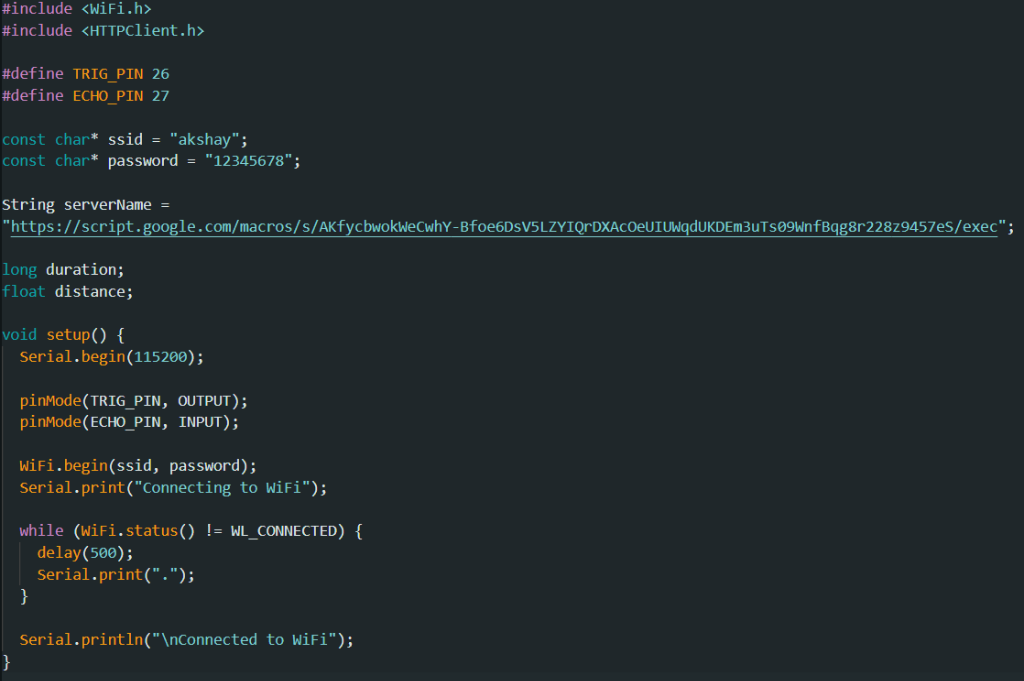
Arduino IDE Code (Part 1)
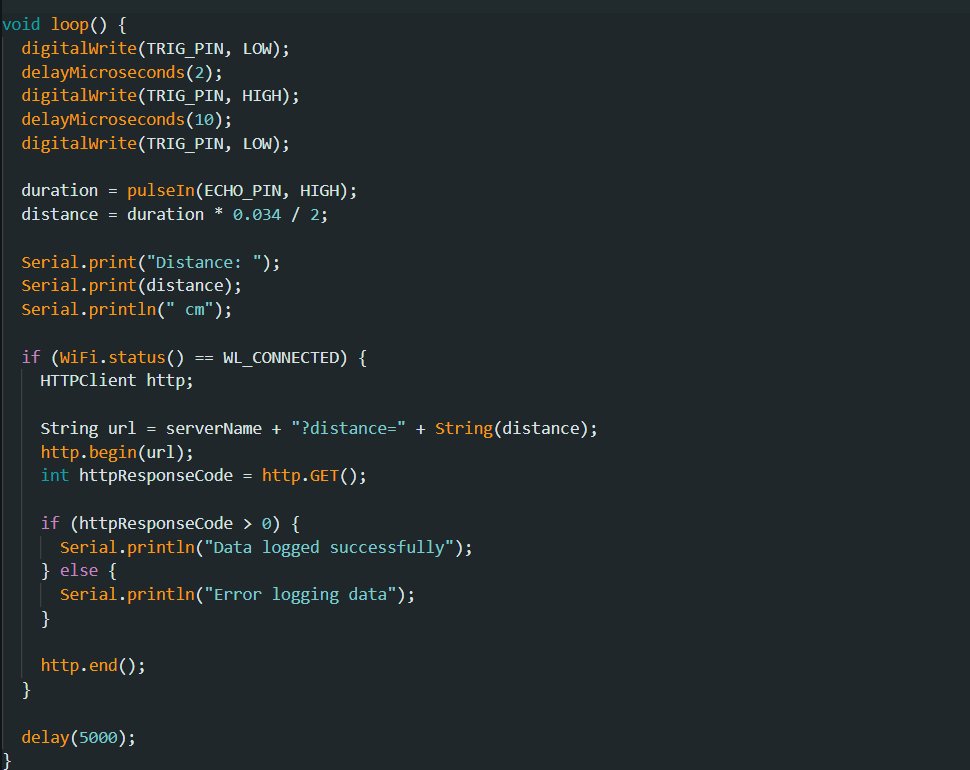
Arduino IDE Code (Part 2)
Google Apps Script Code:
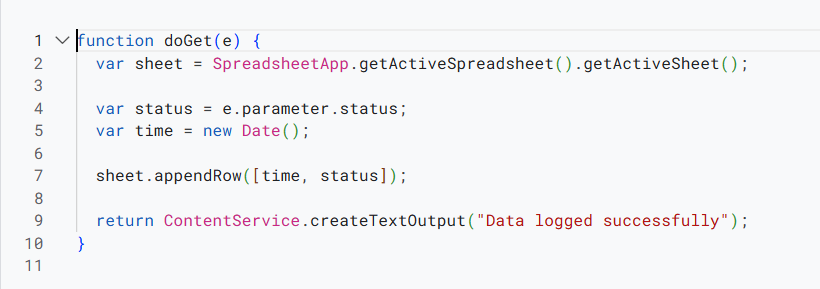
Google Apps Script Code
Observations
- The Serial Monitor displayed real-time distance values measured by the ultrasonic sensor whenever an object was placed in front of it.
- As the distance between the object and the ultrasonic sensor changed, the corresponding distance values were updated continuously on the Serial Monitor.
- When an object was moved closer to or farther from the ultrasonic sensor, a noticeable variation in the measured distance was observed.
- The ESP32 successfully connected to the configured Wi-Fi network and transmitted the distance measurement data to Google Sheets.
- Each distance measurement was logged in Google Sheets along with the corresponding timestamp.
- Upon successful HTTP request transmission, a confirmation message indicating successful data logging was displayed on the Serial Monitor.
- The screenshots of both the Serial Monitor and the Google Sheet showing the logged distance values are attached.
- The Google Sheets link: Google Sheets Data
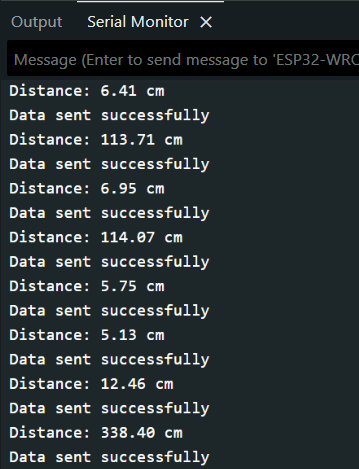
Serial Monitor Output Showing Proximity Detection
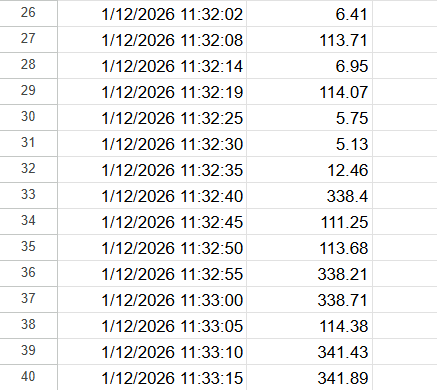
Google Sheets Showing Logged Data with Timestamp
Calculations (Not Applicable)
This section is not required for this experiment.
Results & Analysis
The IoT-based ultrasonic distance measurement system using an ESP32 microcontroller was successfully designed and implemented. The ultrasonic sensor accurately measured the distance of objects placed at varying positions in front of the sensor. The measured distance values were displayed in real time on the Serial Monitor, confirming proper sensor operation, signal processing, and interfacing with the ESP32.
The ESP32 successfully connected to the configured Wi-Fi network and transmitted the data to Google Sheets using a deployed Google Apps Script web application. Each reading was logged along with the corresponding timestamp and updated automatically in the Google Sheet. The experiment successfully demonstrated reliable distance measurement along with cloud-based data logging, fulfilling the objective of integrating sensing, wireless communication using an IoT-based approach.
Limitations:
- Angle of Incidence: Objects positioned at sharp angles may deflect sound waves away from the sensor.
- Soft Materials: Soft fabrics or foam can absorb ultrasonic waves, leading to inaccurate readings.
- Temperature: Sound speed varies with temperature, which can introduce slight errors in distance calculation.
Conclusion
The experiment successfully demonstrated reliable distance measurement along with cloud-based data logging, fulfilling the objective of integrating sensing, wireless communication using an IoT-based approach.
Post-Lab / Viva Voce
The following questions are designed to assess conceptual understanding and applied reasoning based on the experiment.
- Q: Explain why the echo time is divided by 2 in the distance formula. What would be the practical consequence if this division were omitted in the firmware?
A: The ultrasonic pulse travels from the sensor to the object and then back to the receiver, meaning the recorded echo time represents the total round-trip duration. The actual one-way distance is therefore half this value multiplied by the speed of sound. If the division by 2 were omitted, every computed distance would be twice the true value, introducing a consistent factor-of-2 systematic error across all readings. This would not average out over repeated measurements since both readings in any pair would be equally overestimated. - Q: The HC-SR04 has a stated maximum range of 400 cm. What physical factors limit this range, and how should the firmware handle a measurement attempt when an object is beyond this distance?
A: At long distances, the emitted ultrasonic beam diverges and the reflected signal attenuates significantly, eventually falling below the receiver's detection threshold. Additionally, the sensor applies an internal echo timeout of approximately 38 ms. If no echo is received within this window, the ECHO pin is never raised, and pulseIn() returns 0. Firmware must explicitly check for a zero return value and discard that sample rather than passing it into the distance calculation, since using it would yield a spurious distance of 0 cm and corrupt any subsequent analysis. - Q: What is the role of the Google Apps Script in this experiment, and why is the timestamp generated server-side rather than on the ESP32?
A: The Google Apps Script acts as a serverless HTTP endpoint that receives data from the ESP32 and writes it into Google Sheets. The timestamp is generated server-side because the ESP32 does not have a battery-backed real-time clock and loses time reference on power cycles or resets. The server always has an accurate system clock. However, this approach introduces a latency offset between the actual measurement time and the logged timestamp equal to the network round-trip delay, which can range from a few hundred milliseconds to over a second depending on network conditions. - Q: If two consecutive distance readings are cm and cm, taken with a sampling interval of 200 ms, what is the computed approach speed of the object?
A: The speed is computed as the magnitude of the change in distance divided by the time interval: cm/s. This represents the radial speed of the object along the sensor axis. It does not account for any transverse component of motion, which the sensor cannot detect. - Q: A student notices that the Serial Monitor shows consistent distance readings but no data appears in Google Sheets. List three possible causes and the corresponding diagnostic steps.
A: First, the Wi-Fi credentials entered in the firmware may be incorrect or the network may be unavailable — the student should check the Serial Monitor for a Wi-Fi connection confirmation message and verify that the SSID and password match the access point. Second, the Google Apps Script may not have been deployed as a web application with public access permissions — the student should re-open the Apps Script editor, check deployment settings, and ensure access is set to 'Anyone'. Third, the web application URL hardcoded in the ESP32 program may be outdated or contain a typographical error — the student should copy the URL again from the current deployment and re-upload the firmware. - Q: How does the angle between the object's surface and the sensor axis affect measurement accuracy, and is this error random or systematic?
A: The HC-SR04 only measures the radial distance along its acoustic axis. If the reflecting surface is tilted at an angle relative to this axis, a significant portion of the sound energy is reflected away from the receiver rather than back toward it. This reduces echo signal strength and can cause intermittent missed detections, introducing random errors when readings drop out. For objects moving at an angle to the axis, the measured rate of change of distance corresponds to only the radial velocity component , systematically underestimating the true speed. The geometric error is systematic while the signal-loss effect is stochastic. - Q: Why is it important to set the firmware sampling interval longer than the expected HTTP request completion time ?
A: If the sampling interval is shorter than , a new HTTP GET request is initiated before the previous one has completed. Since the ESP32 runs the Arduino loop on a single core in its default configuration, this can cause the pending request to be abandoned or for the TCP stack to become congested, resulting in dropped data points, Wi-Fi disconnections, or watchdog timer resets. Setting the sampling interval greater than ensures that each HTTP transaction fully completes before the next measurement cycle begins, maintaining reliable one-to-one correspondence between measurements and logged rows. - Q: What modification to the experiment setup and firmware would be required to also log acceleration in addition to distance?
A: To compute acceleration, at least three consecutive distance measurements are required. Using a central difference approximation, instantaneous speed can first be estimated between pairs of readings, and then acceleration computed as where and are speeds derived from successive distance pairs. The firmware must maintain a rolling buffer of the last three distance readings, compute both speed and acceleration after each new sample, and include the acceleration value as an additional query parameter in the HTTP GET request. The Apps Script must be updated to extract this parameter and write it into a dedicated column in the Google Sheet. No additional hardware is needed.
References & Resources (Not Applicable)
This section is not required for this experiment.
Was this experiment helpful?
Your feedback helps us improve
Please Sign In to rate this experiment.