Hardware-Oriented
Speed Measurement using Ultrasonic Sensor interfaced with ESP32
Aim
To design and implement a speed measurement system using an ultrasonic sensorultrasonic sensorA transducer that converts electrical energy into high-frequency sound waves and vice versa. It measures distance by calculating the time-of-flight of the sound echo from an object. interfaced with an ESP32esp32A low-cost, low-power system-on-a-chip microcontroller with integrated Wi-Fi and Bluetooth capabilities, widely used by students and engineers for IoT applications and sensor data acquisition. microcontroller, and to log the measured speed data along with timestamps to Google Sheets for analysis using Wi-Fi connectivity.
Apparatus & Software
Hardware Components:
- ESP32 Microcontroller
- Ultrasonic Sensor (HC-SR04 or equivalent)
- USB Cable, Jumper Wires
- Breadboard
- Moving Object (for speed measurement)
Software and Tools:
- Computer or Laptop
- Arduino IDE with ESP32 Board Support Package
- Google Sheets
- Active Internet Connection (Wi-Fi)
Theory
1.1 Ultrasonic Sensor Working Principle
An ultrasonic sensor such as the HC-SR04 operates by emitting a short burst of ultrasonic waves at 40 kHz from its transmitter and detecting the reflected echo at its receiver. The sensor measures the time elapsed between transmission and reception of the echo pulse. Since sound travels at a known speed in air, the distance to the reflecting object can be determined from this time-of-flighttime-of-flightThe principle used by ultrasonic and certain optical sensors to measure distance based on the exact time it takes for a propagated signal to travel to an object and reflect back. measurement.
The distance to the object is calculated as:
where m/s is the speed of sound in air at room temperature and is the total round-trip time of the ultrasonic pulse. The division by 2 accounts for the pulse travelling to the object and back.
1.2 Speed Computation from Successive Distance Measurements
Speed cannot be measured directly by a single ultrasonic pulse. Instead, the ESP32 takes two successive distance measurements separated by a known time interval . The instantaneous speed of the moving object is then computed as the magnitude of the displacement between the two measurements divided by the time interval:
where and are the distances recorded at times and respectively, and . A smaller improves temporal resolution but increases sensitivity to measurement noise, while a larger smooths noise but reduces the ability to track rapid speed changes.
1.3 HC-SR04 Sensor Timing and Signal Interface
The HC-SR04 sensor is triggered by applying a HIGH pulse of at least 10 µs to its TRIG pin. In response, it emits eight ultrasonic bursts and then raises the ECHO pin HIGH for a duration proportional to the round-trip time. The ESP32 measures this ECHO pulse width using its internal timer to derive . The TRIG and ECHO pins interface directly with the ESP32 GPIO at 3.3 V logic levels, making no level-shifting circuitry necessary.
The usable measurement range of the HC-SR04 is approximately 2 cm to 400 cm, with a stated accuracy of ±3 mm under ideal conditions. Objects outside this range or at oblique angles may produce weak or absent echoes, resulting in timeout readings that must be filtered out in firmware.
1.4 ESP32 Microcontroller and Timer Resolution
The ESP32 is a dual-core 32-bit microcontroller operating at up to 240 MHz, featuring built-in Wi-Fi (IEEE 802.11 b/g/n) and Bluetooth capabilities. For this experiment, the ESP32 uses its microsecond-resolution hardware timer via the pulseIn() function in the Arduino framework to capture the ECHO pulse width accurately. The minimum resolvable time difference between two distance samples is determined by the sensor's measurement cycle time, which is approximately 60 ms including echo timeout.
The speed measurement uncertainty due to timer quantisation is:
where is the timer resolution (1 µs for the ESP32). For a sampling interval of 100 ms, this gives an uncertainty of approximately 0.17 cm/s, which is negligible for most practical speed measurements.
1.5 Wi-Fi Connectivity and Cloud Data Logging
The ESP32 connects to a local Wi-Fi network in Station (STA) mode and obtains an IP address via DHCP. Measured speed values are transmitted to a Google Apps Script web application using HTTP GET requests, with the speed value encoded as a URL query parameter. The Apps Script function receives each request, extracts the speed value, and appends it as a new row in a Google Sheet along with a server-generated timestamp.
The total latency for each cloud log entry is:
Under typical network conditions, ranges from 300 ms to 2 s. The firmware sampling interval must be set greater than to prevent request collisions and ensure every measurement is individually logged. The complete data pipeline is: HC-SR04 → ESP32 GPIO/Timer → Speed Calculation → Wi-Fi → Internet → Google Apps Script → Google Sheets.
Pre-Lab / Circuit Diagram
Circuit Connections:
Note: A circuit diagram is not available for this experiment. Please follow the connection details below.
- VCC → ESP32 WIN/5V
- GND → ESP32 GND
- Trig → ESP32 GPIO Pin (e.g., D5)
- Echo → ESP32 GPIO Pin (e.g., D18)
Procedure
- Connect the ESP32 and ultrasonic sensor on a breadboard using jumper wires.
- Connect the ESP32 to a computer using a USB cable and open Arduino IDE.
- Select the appropriate ESP32 board and COM port, then execute the ESP32 program code.
- Upload the program to the ESP32 and open the Serial Monitor to observe real-time distance and speed values by moving an object in front of the ultrasonic sensor.
- Create a Google Sheet and open the Apps Script editor from the Extensions menu.
- Execute the required function and deploy it as a web application.
- Enter the generated web application URL and Wi-Fi credentials in the ESP32 program and upload the updated code.
- Verify that the speed values along with timestamps are logged in Google Sheets, while distance and speed are displayed on the Serial Monitor.
Simulation / Execution
Arduino IDE Code:
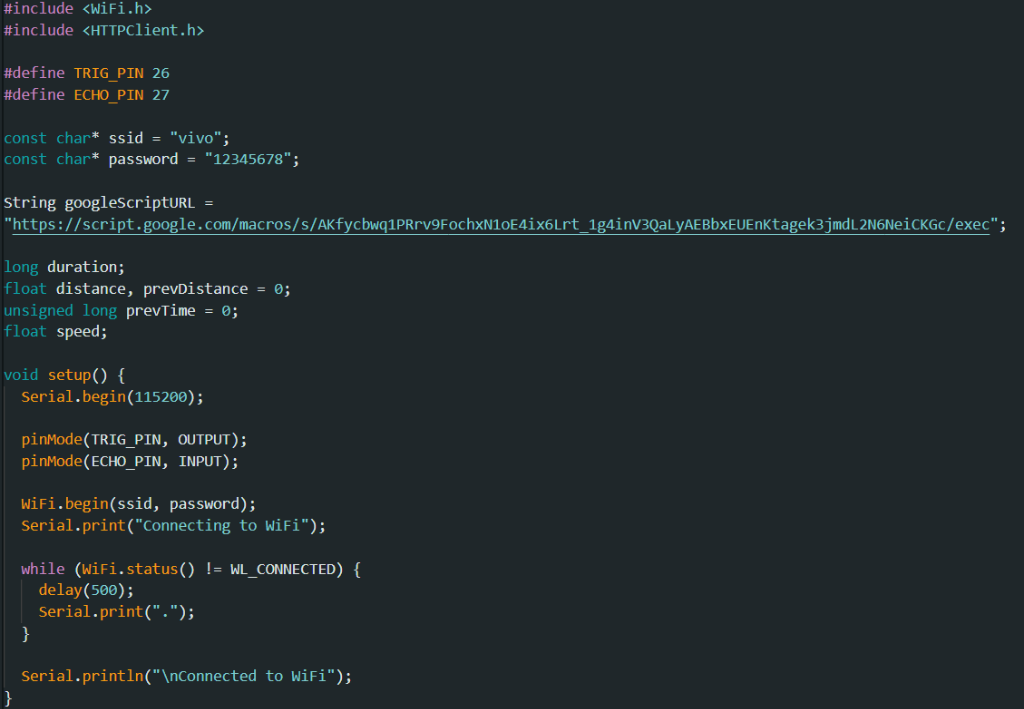
Arduino IDE Code (Part 1)
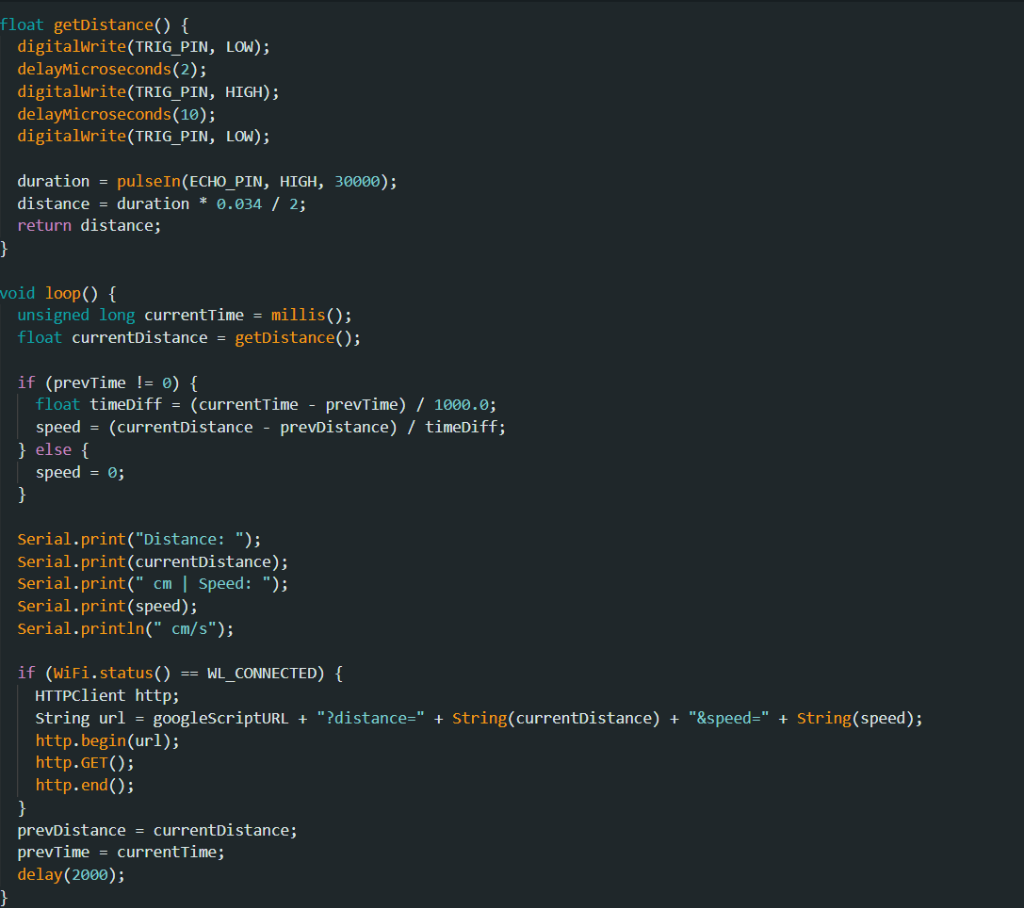
Arduino IDE Code (Part 2)
Google Apps Script Code:
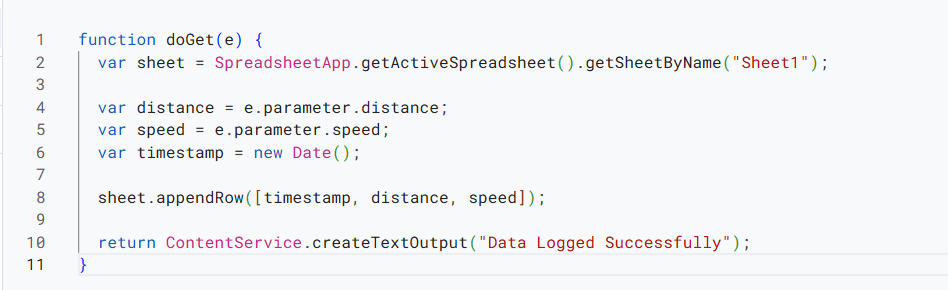
Google Apps Script Code
Observations
- The Serial Monitor displayed real-time distance and corresponding speed values measured using the ultrasonic sensor and ESP32.
- As the object moved relative to the ultrasonic sensor, continuous updates in distance readings were observed, resulting in corresponding changes in the calculated speed values.
- When the object was moved closer to or farther from the ultrasonic sensor at different rates, noticeable variations in the computed speed values were observed on the Serial Monitor.
- The ESP32 successfully connected to the configured Wi-Fi network and transmitted the calculated speed data to Google Sheets.
- Each speed measurement was logged in Google Sheets along with the corresponding timestamp for further analysis.
- The Google Sheets link containing the logged speed data: Google Sheets Data
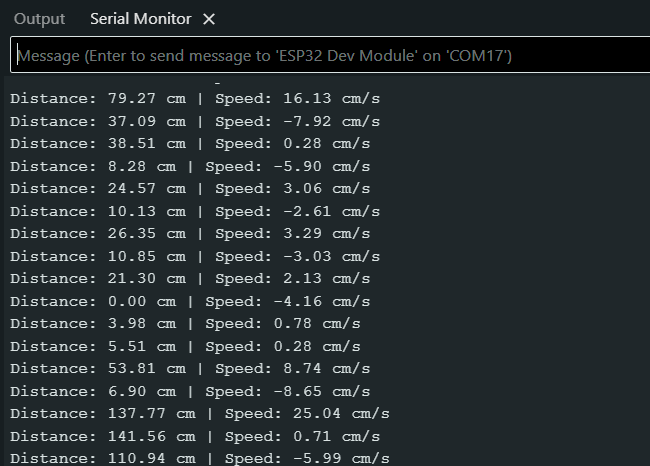
Serial Monitor Output showing Distance and Speed Values
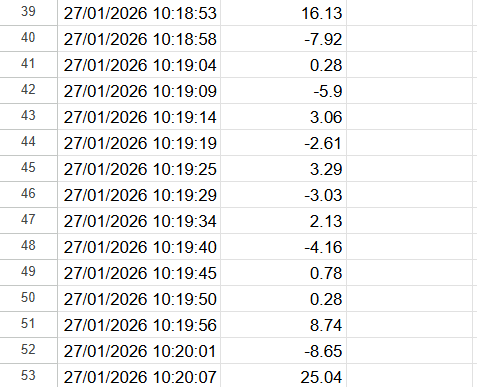
Google Sheets Showing Logged Data with Timestamp
Calculations (Not Applicable)
This section is not required for this experiment.
Results & Analysis
The IoT-based speed measurement system using an ultrasonic sensor interfaced with an ESP32 microcontroller was successfully designed and implemented. The ultrasonic sensor was used to obtain successive distance measurements, from which the speed of a moving object was calculated. The distance and corresponding speed values were displayed in real time on the Serial Monitor, confirming correct sensor operation, signal processing, and speed computation by the ESP32.
The ESP32 successfully connected to the configured Wi-Fi network and transmitted the calculated speed data to Google Sheets using a deployed Google Apps Script web application. Each speed value was logged along with the corresponding timestamp and updated automatically in the Google Sheet. The experiment successfully demonstrated real-time speed measurement and reliable cloud-based data logging, thereby fulfilling the objective of integrating sensing, computation, and wireless communication using an IoT-based approach.
Limitations:
- Calculation Delay: Rapid speed changes might be missed depending on the sampling interval.
- Object Size: Small or narrow objects may not reflect enough sound for reliable detection.
- Network Latency: Wi-Fi transmission delays can cause a lag between actual measurement and cloud logging.
Conclusion
The experiment successfully demonstrated real-time speed measurement and reliable cloud-based data logging, thereby fulfilling the objective of integrating sensing, computation, and wireless communication using an IoT-based approach.
Post-Lab / Viva Voce
Note: The following questions are concept- and application-based, ranging from medium to hard difficulty.
- Q: The ultrasonic sensor measures distance, yet the experiment reports speed. Describe the complete signal processing chain from a single ECHO pulse to a final speed value displayed on the Serial Monitor.
A: The ESP32 asserts the TRIG pin HIGH for 10 µs, prompting the HC-SR04 to emit an ultrasonic burst. The ECHO pin is held HIGH for a duration proportional to the round-trip travel time of the reflected pulse. The ESP32 captures this duration using pulseIn() and computes distance as . Two consecutive distance samples and separated by a firmware-controlled interval are then used to compute speed as . This value is formatted as a string and printed to the Serial Monitor via UART. - Q: Why is it necessary to divide the echo time by 2 when computing distance, and what would happen to all subsequent speed calculations if this factor were omitted?
A: The echo time represents the total round-trip travel time of the ultrasonic pulse — from the sensor to the object and back. The actual one-way distance is therefore half the product of sound speed and echo time. If the division by 2 were omitted, every computed distance would be exactly twice the true value. Since speed is derived from the difference of two distances divided by time, the computed speed would also be twice the actual value, introducing a systematic factor-of-2 error in all readings. This error is constant and does not cancel in the subtraction because both and are scaled equally. - Q: A student observes that the measured speed fluctuates significantly even when the object is moving at a constant velocity. Identify two sources of this fluctuation and propose a firmware-level mitigation for each.
A: First, acoustic noise and multipath reflections cause occasional spurious ECHO pulse widths that do not correspond to the actual object. This produces outlier distance values and consequently large instantaneous speed spikes. Mitigation: implement a median filter over three to five consecutive distance readings before computing speed, so that isolated outlier values are suppressed. Second, the pulseIn() function has a 1 µs timer resolution, meaning the quantisation error in propagates into both and , and their difference amplifies this error when is small. Mitigation: increase the sampling interval to reduce the relative contribution of quantisation noise to the computed speed. - Q: The HC-SR04 datasheet specifies a maximum measurement range of 400 cm. What physical and electrical factors determine this upper limit, and what happens in firmware when an object is beyond this range?
A: The upper range limit is set by ultrasonic beam divergence and signal attenuation — at long distances, the reflected echo is too weak to trigger the receiver threshold reliably. Additionally, the sensor's internal timeout is approximately 38 ms corresponding to a 650 cm round trip, beyond which no ECHO pulse is generated. In firmware, pulseIn() returns 0 when no pulse is received within its timeout window. If this 0 value is used directly in the distance formula, it produces , and if a previous valid reading existed, an erroneous large speed value is computed. Robust firmware must check for a 0 return value and discard that sample rather than using it in the speed calculation. - Q: Explain why the speed computed from two closely-spaced distance samples is more sensitive to noise than speed computed from two samples taken further apart in time, using the error propagation formula.
A: Let each distance measurement have an uncertainty due to sensor noise. The computed speed is . By error propagation, the uncertainty in speed is . As decreases, increases inversely — halving doubles the speed uncertainty. Conversely, a larger divides the fixed measurement noise over a longer time window, reducing its effect on the speed estimate. The trade-off is temporal resolution: a large may miss rapid speed changes occurring within the interval. - Q: The Google Sheets timestamps are generated when the Apps Script receives the HTTP request, not when the ESP32 takes the measurement. Under what experimental conditions does this distinction matter, and how would you modify the system to eliminate this ambiguity?
A: The distinction matters whenever the network round-trip time is variable or the ESP32 experiences Wi-Fi reconnection delays, causing the logged timestamp to differ from the actual measurement time by up to several seconds. This is significant when correlating speed profiles with external events or when computing acceleration from consecutive logged speed values. To eliminate the ambiguity, synchronise the ESP32 RTC with an NTP server at boot using configTime() and pool.ntp.org. At the moment each speed sample is computed, record the local time using time() and include it as an additional query parameter in the HTTP GET request, so the sheet stores the acquisition time independently of server processing latency. - Q: If the object moves at an angle to the sensor axis rather than directly toward or away from it, how does this affect the measured speed, and is the error systematic or random?
A: The HC-SR04 measures only the component of the object's displacement along the sensor's acoustic axis — the radial distance. If the object moves at an angle relative to the axis, the rate of change of radial distance is , so the sensor underestimates the true speed by a factor of . This is a systematic error: it consistently reports a lower speed than actual, and the magnitude of underestimation grows as increases. At (purely lateral motion), the sensor detects no change in distance and reports zero speed regardless of actual velocity. The error is not random because is determined by the physical geometry of the setup. - Q: The ESP32 uses a single-core execution model in Arduino framework by default. How does the blocking nature of pulseIn() affect Wi-Fi transmission timing, and how can this be resolved in a production implementation?
A: pulseIn() blocks the main execution thread for the entire duration of the ECHO pulse, which can be up to 38 ms for out-of-range readings. During this blocking period, the ESP32 Wi-Fi stack cannot process incoming acknowledgements or maintain the TCP connection, potentially causing packet loss or connection drops during transmission. In a production implementation, this is resolved by using hardware interrupt-based echo capture: configure the ECHO pin as an interrupt source, record the rising-edge timestamp in an ISR, record the falling-edge timestamp in a second ISR, and compute as their difference in the main loop without blocking. This frees the CPU to service the Wi-Fi stack during the measurement window. - Q: Two students run the same experiment with identical hardware but different firmware sampling intervals — one uses 100 ms and the other uses 1000 ms. Compare their results in terms of speed accuracy, data resolution, and Google Sheets quota consumption.
A: The student using 100 ms intervals captures ten times more speed samples per second, providing higher temporal resolution and the ability to observe rapid acceleration or deceleration events. However, speed uncertainty is higher due to the smaller amplifying distance noise, and ten times as many HTTP requests are sent to Google Apps Script, consuming the daily execution quota approximately ten times faster. The student using 1000 ms intervals has lower temporal resolution and may miss transient speed changes, but benefits from lower noise in each speed estimate, more stable Wi-Fi transmission without request overlap, and significantly lower quota usage — making it more appropriate for long-duration unattended logging sessions. - Q: Describe how you would extend this system to measure not just speed but also acceleration, and identify any additional hardware or firmware changes required.
A: Acceleration can be computed from three consecutive speed values: using a central difference approximation, which is more accurate than a forward difference. No additional hardware is required since the HC-SR04 and ESP32 are already in place. Firmware changes needed are: maintain a rolling buffer of at least three consecutive speed values; compute acceleration from the oldest and newest values after each new sample is added; include the acceleration value as an additional parameter in the HTTP GET request to Apps Script; and modify the Apps Script to write acceleration into a dedicated column in the Google Sheet. Care must be taken to handle the startup transient where the buffer is not yet fully populated.
References & Resources (Not Applicable)
This section is not required for this experiment.
Was this experiment helpful?
Your feedback helps us improve
Please Sign In to rate this experiment.