Hardware-Oriented
Design and Implementation of 4:1 Multiplexer and OR Gate using Multiplexer on FPGA Board
Aim
To design and implement a 4:1 Multiplexer on the FPGAfpgaField-Programmable Gate Array — an integrated circuit containing configurable logic blocks and programmable interconnects that can be reconfigured after manufacturing to implement custom digital circuits. board and to implement an OR gate using a multiplexer.
Apparatus & Software
| S.No. | Tool / Equipment | Purpose |
|---|---|---|
| 1 | FPGA Development Board (Spartan-6) | Hardware implementation and verification |
| 2 | Xilinx ISE Software | HDL design entry, synthesis, and implementation |
| 3 | ISim Simulator | Functional simulation before hardware download |
| 4 | USB Programming Cable | Downloading bitstream to FPGA board |
| 5 | PC / Workstation | Running the Xilinx software environment |
Theory
Multiplexer: A multiplexer (MUX) is a combinational circuit that selects one of several digital input signals and forwards the selected input onto a single output line. The selection is controlled by select lines. A 4:1 multiplexer has 4 data input lines (I0–I3), 2 select lines (S0, S1), and 1 output line (Y).
The select lines determine which input is passed to the output according to the following selection table:
| S1 | S0 | Output Y |
|---|---|---|
| 0 | 0 | I0 |
| 0 | 1 | I1 |
| 1 | 0 | I2 |
| 1 | 1 | I3 |
OR Gate using a Multiplexer: Any logic gate can be implemented using a multiplexer. An OR gate with inputs A and B can be implemented using a 2:1 MUX by using A as the select line and connecting the data inputs such that: when A=0, the output follows B (set I0=B), and when A=1, the output is always 1 regardless of B (set I1=1). This setup ensures the output Y = A + B.
Pre-Lab / Circuit Diagram (Not Applicable)
This section is not required for this experiment.
Procedure
Part 1: 4:1 Multiplexer
1. Project Setup: Create a new Xilinx ISE/Vivado project targeting your FPGA device.
2. Verilog Code: Create a module `mux4_1` using an `always` block and `case` or `if-else` statement to select inputs based on `Sel`.
3. Simulation: Verify the design using ISim. Test all select combinations (00, 01, 10, 11) with distinct input values.
4. Implementation: Create a UCF file mapping `I[3:0]`, `Sel[1:0]`, and `Y` to board switches and LEDs. Synthesize and generate bitstreambitstreamThe binary configuration file downloaded to an FPGA that programs its internal logic blocks and routing interconnects to implement a specific design..
5. Test: Download bitstream to FPGA and verify hardware behavior.
1. Project Setup: Create a new Xilinx ISE/Vivado project targeting your FPGA device.
2. Verilog Code: Create a module `mux4_1` using an `always` block and `case` or `if-else` statement to select inputs based on `Sel`.
3. Simulation: Verify the design using ISim. Test all select combinations (00, 01, 10, 11) with distinct input values.
4. Implementation: Create a UCF file mapping `I[3:0]`, `Sel[1:0]`, and `Y` to board switches and LEDs. Synthesize and generate bitstreambitstreamThe binary configuration file downloaded to an FPGA that programs its internal logic blocks and routing interconnects to implement a specific design..
5. Test: Download bitstream to FPGA and verify hardware behavior.
Part 2: OR Gate using Multiplexer
1. Verilog Code: Create a module `or_gate_mux` using a conditional operator (ternary) or `if-else` logic: `assign Y = A ? 1 : B;`.
2. Simulation: Simulating this module should check the standard OR truth table.
3. Implementation: Map `A`, `B`, and `Y` in the UCF file. Synthesize and program the board.
4. Test: Verify all 4 input cases match the OR gate truth table.
1. Verilog Code: Create a module `or_gate_mux` using a conditional operator (ternary) or `if-else` logic: `assign Y = A ? 1 : B;`.
2. Simulation: Simulating this module should check the standard OR truth table.
3. Implementation: Map `A`, `B`, and `Y` in the UCF file. Synthesize and program the board.
4. Test: Verify all 4 input cases match the OR gate truth table.
Simulation / Execution
Verilog Code for 4:1 Multiplexer:
verilog
module Mux(
  input [3:0] I,
  input [1:0] Sel,
  output reg Y
);
  always@(Sel or I)
  begin
    case(Sel)
      2'b00: Y = I[0];
      2'b01: Y = I[1];
      2'b10: Y = I[2];
      2'b11: Y = I[3];
    endcase
  end
endmodule
User Constraints File (UCF) for 4:1 MUX:
properties
NET "Sel[0]" LOC = P22;
NET "Sel[1]" LOC = P21;
NET "I[0]"   LOC = P17;
NET "I[1]"   LOC = P16;
NET "I[2]"   LOC = P15;
NET "I[3]"   LOC = P14;
NET "Y"      LOC = P24;
Verilog Code for OR Gate using Multiplexer:
verilog
module OR_using_mux(
  input A,
  input B,
  output Y
);
  assign Y = A ? 1 : B;
endmodule
User Constraints File (UCF) for OR Gate:
properties
NET "A" LOC = P22;
NET "B" LOC = P21;
NET "Y" LOC = P30;
Observations
Part 1: 4:1 Multiplexer — Hardware Implementation
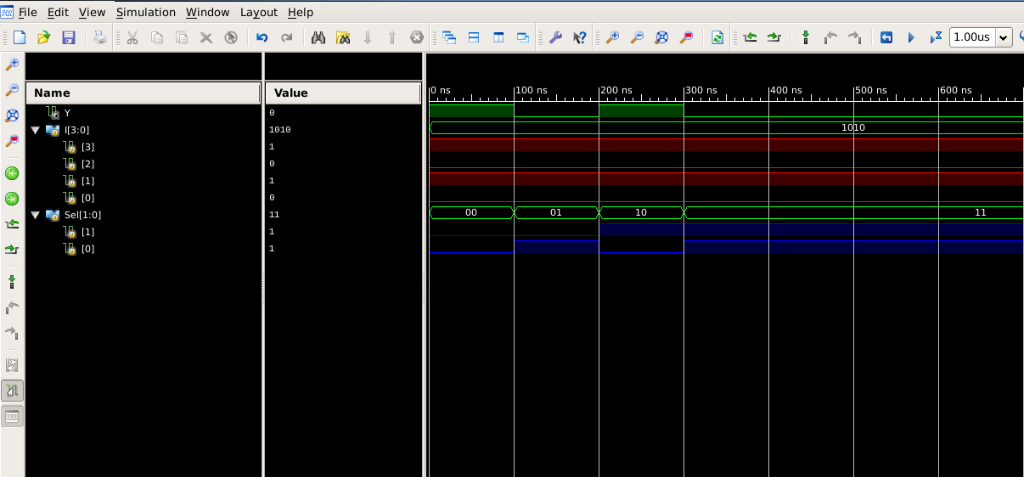
Simulation Output for 4:1 Multiplexer showing select lines and output.
| Case | S1 | S0 | Selected Input | Input Value | Output Y |
|---|---|---|---|---|---|
| 1 | 0 | 0 | I0 | High (1) | 1 |
| 2 | 0 | 1 | I1 | High (1) | 1 |
| 3 | 1 | 0 | I2 | High (1) | 1 |
| 4 | 1 | 1 | I3 | High (1) | 1 |
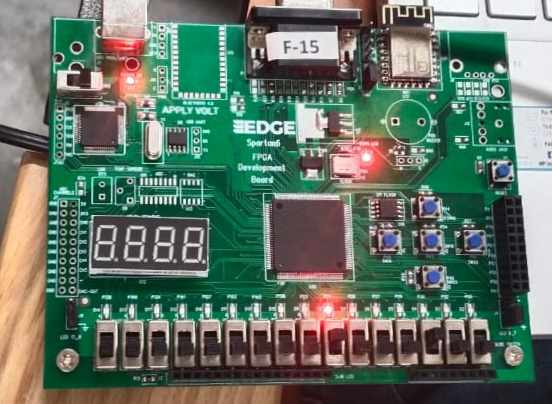
Case 1: S0=0, S1=0 — I0 selected, Output Y=1.
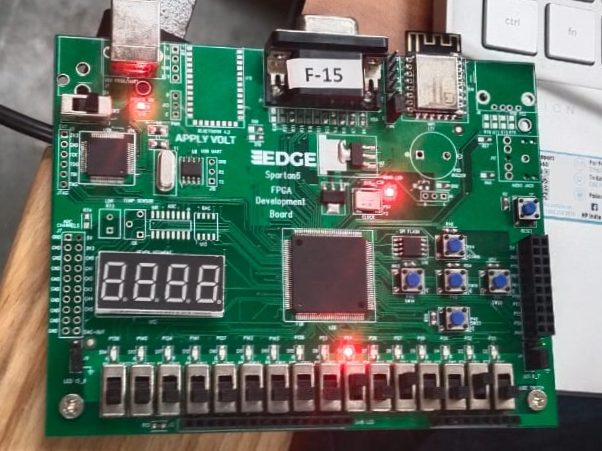
Case 2: S0=0, S1=1 — I1 selected, Output Y=1.
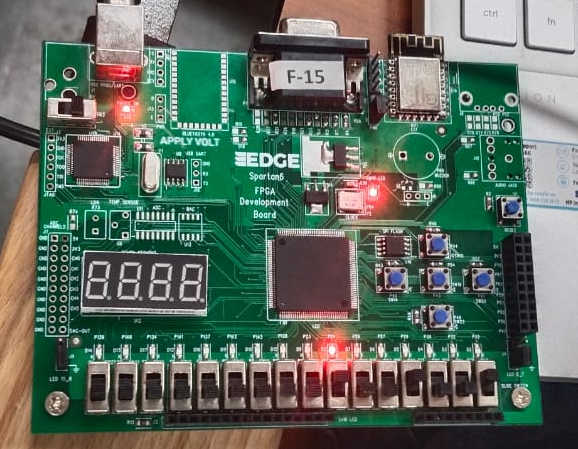
Case 3: S0=1, S1=0 — I2 selected, Output Y=1.
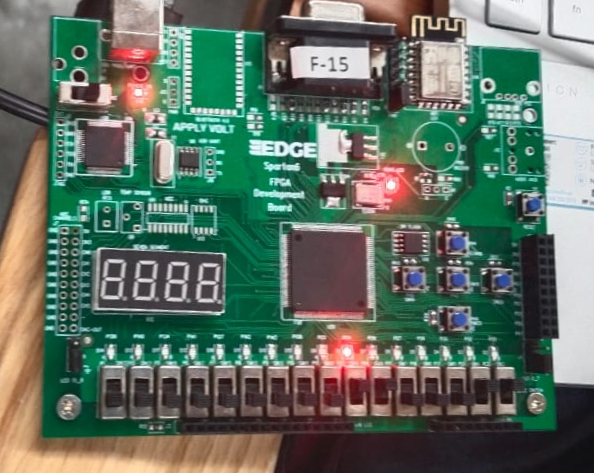
Case 4: S0=1, S1=1 — I3 selected, Output Y=1.
Part 2: OR Gate using Multiplexer
| Case | A (Select) | B (I0) | Output Y | Expected (A+B) |
|---|---|---|---|---|
| 1 | 0 | 0 | 0 | 0 |
| 2 | 0 | 1 | 1 | 1 |
| 3 | 1 | 0 | 1 | 1 |
| 4 | 1 | 1 | 1 | 1 |
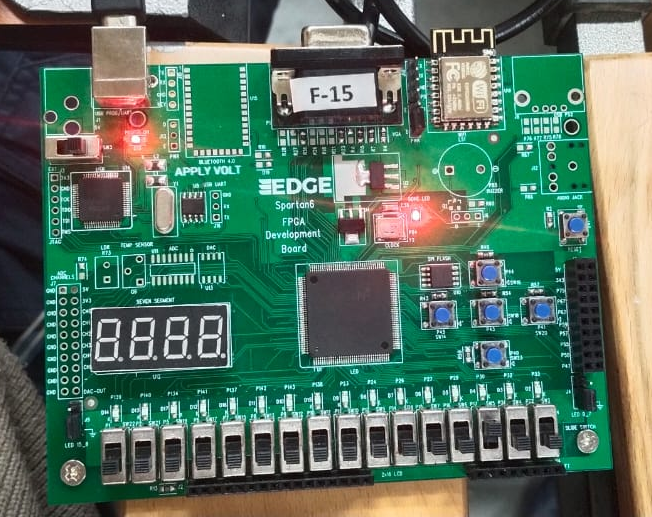
OR via MUX Case 1: A=0, B=0 — Output Y=0.
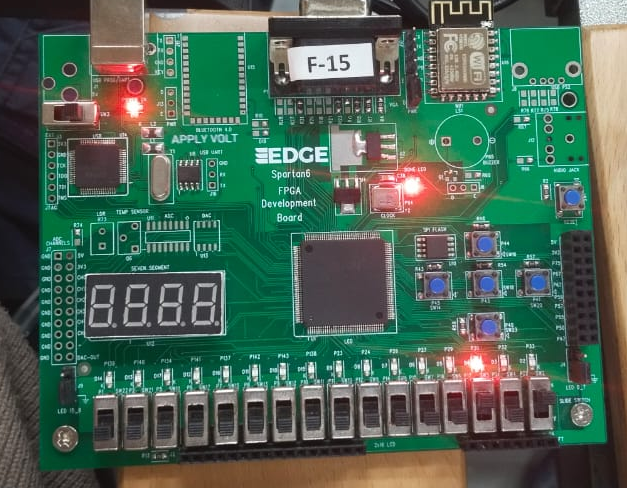
OR via MUX Case 2: A=0, B=1 — Output Y=1.
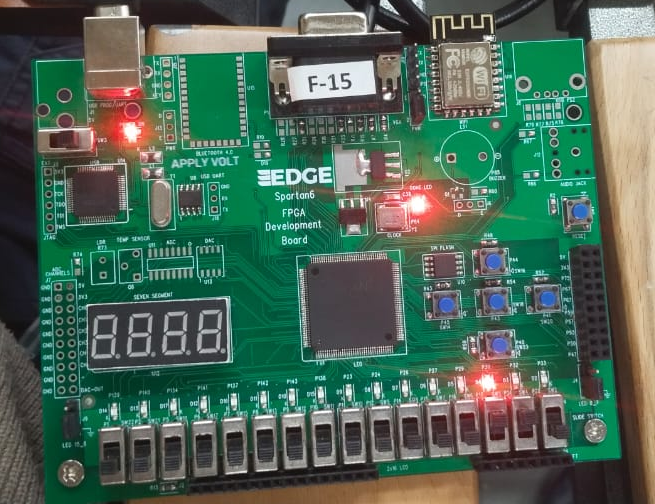
OR via MUX Case 3: A=1, B=0 — Output Y=1.
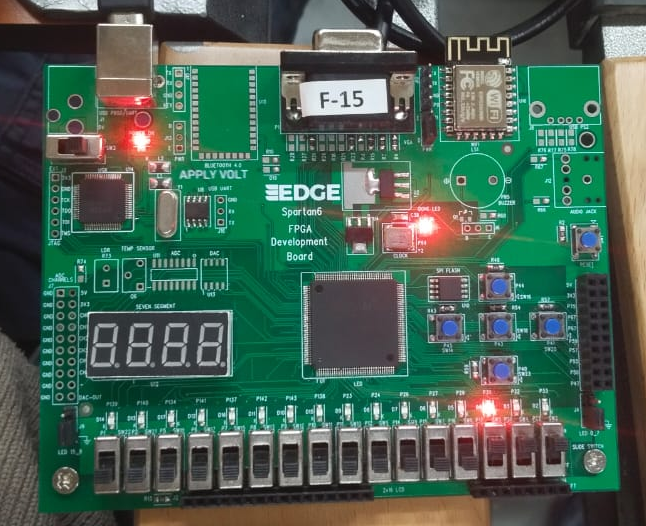
OR via MUX Case 4: A=1, B=1 — Output Y=1.
Calculations
Verification of OR Gate using MUX logic:
This confirms that the 2:1 MUX configuration with A as select, I1=1 and I0=B correctly implements the OR function.
Results & Analysis
The multiplexer experiments demonstrated two distinct capabilities:
- Data Routing (4:1 MUX): The Select lines (`Sel`) functioned as a digital address, accurately passing the corresponding input data (`I0`-`I3`) to the single output line `Y`. No crosstalk was observed between unselected channels.
- Universal Logic (OR via MUX): By fixing data inputs (`I0=B`, `I1=1`) and using `A` as a selector, the 2:1 MUX successfully replicated the truth table of an OR gate, verifying the universality of multiplexers.
Conclusion
This experiment highlighted the versatility of Multiplexers as not just data selectors, but as universal function generators. The ability to implement an OR gate using a 2:1 MUX underscores the principle that any Boolean function can be realized using multiplexers, a concept central to how FPGAs implement logic using LUTs.
Post-Lab / Viva Voce
- Q: What is a multiplexer, and how does it differ from a demultiplexer?
A: A multiplexer (MUX) selects one of several input signals and routes it to a single output. A demultiplexer (DEMUX) takes a single input signal and routes it to one of several outputs. - Q: How many select lines does a 4:1 multiplexer require, and why?
A: A 4:1 multiplexer requires 2 select lines because 2 binary bits can represent 4 distinct values (00, 01, 10, 11), one for each of the 4 input channels. - Q: Explain how any Boolean function of two variables can be implemented using a 4:1 MUX.
A: A 4:1 MUX has two select lines which can be driven by input variables. By setting each data input Ii to the desired constant (0 or 1), any truth table of a 2-variable Boolean function can be implemented. - Q: What is the advantage of implementing logic gates using multiplexers?
A: Using multiplexers reduces the number of different IC types needed and simplifies circuit modification. In FPGAs, LUTs are essentially programmable multiplexers. - Q: In the OR gate using a 2:1 MUX, why is A used as the select line?
A: Using A as the select line allows a clean assignment: when A=0, Output=B; when A=1, Output=1. This creates the OR logic. Using B as the select line would also work due to the commutative property of OR. - Q: What is the Boolean expression for the output of a 4:1 MUX?
A: The Boolean expression is: Y = (S1' S0' I0) + (S1' S0 I1) + (S1 S0' I2) + (S1 S0 I3). - Q: What happens if more than one select line combination is applied simultaneously (glitching)?
A: Logic levels in digital circuits switch rapidly. During transitions, non-ideal signal timing can cause temporary glitches (hazards) where the output may reflect an incorrect input briefly.
References & Resources
Digital Electronics Lab Manual
Download Common Lab Manual (PDF)
Download Common Lab Manual (PDF)
Note: This manual covers all experiments for the Digital Electronics course.
Was this experiment helpful?
Your feedback helps us improve
Please Sign In to rate this experiment.